



Contents: Steering column switch ⬇ Switches on the instrument panel ⬇ Hazard warning switch ⬇ Electric outside mirror switch ⬇ Side console ⬇ Central light switch panel ⬇
Steering column switch
Removal the steering column switch
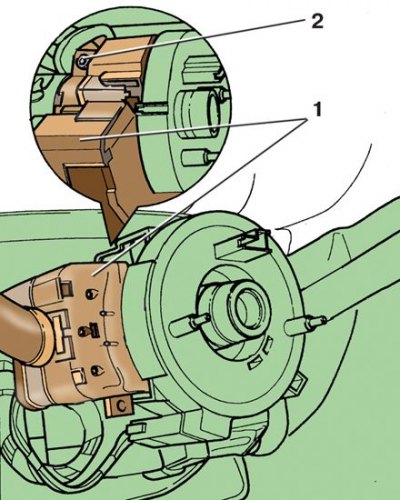
1 – steering column switch; 2 – tie bolt
Adjusting the position of the steering column switch
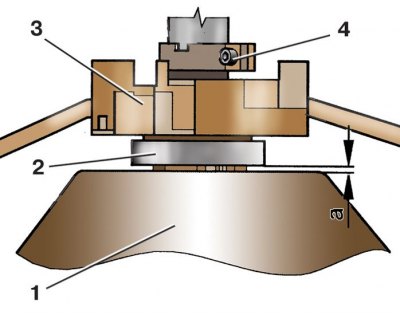
1 – steering wheel; 2 – return ring; 3 – steering column switch; 4 – tie bolt
1. Disconnect the wire from the "-" terminal of the battery.
2. Remove the steering wheel (see subsection 8.1).
3. Remove the return and contact rings (see subsection 8.2).
4. Disconnect the two wire connectors from the steering column switch 1 (see the figure Removing the steering column switch).
5. Loosen the tightening of the clamping bolt 2.
6. Remove the steering column switch from the steering column.
7. Install the switch on the steering column without tightening the clamp bolt and connect the pads with wires to it.
8. Install the return and contact rings and steering wheel.
9. Align the switch horizontally.
10. Adjust the position of the switch so that the size a (see the figure Adjusting the position of the steering column switch) was 2.5 mm, and tighten the clamping bolt 4.
11. Install the steering column covers.
Switches on the instrument panel
Removal the switch on the instrument panel
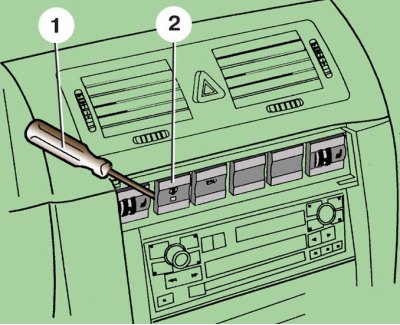
1 – screwdriver; 2 – switch
1. Disconnect the wire from the "-" terminal of the battery.
2. Carefully pry it off with a screwdriver 1 (see figure Removing the switch on the instrument panel) on the left side, remove switch 2 from the instrument panel.
3. Disconnect the wiring harness from the switch.
4. When installing the switch, press it until it locks into place in the instrument panel.
Hazard warning switch
Removal the hazard warning switch
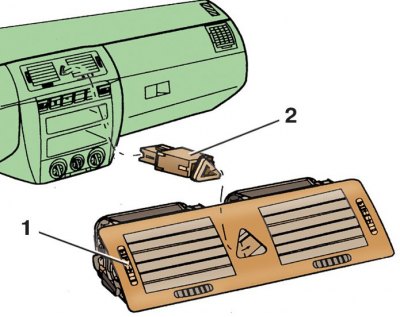
1 – central nozzles; 2 – switch
1. Disconnect the wire from the "-" terminal of the battery.
2. Remove the central nozzles from the instrument panel (see subsection 11.8).
3. Remove switch 2 (see figure Removing the hazard warning switch) from the central nozzles 1.
4. Install the switch in reverse order.
Electric outside mirror switch
Removal and installation the electric outside mirror switch
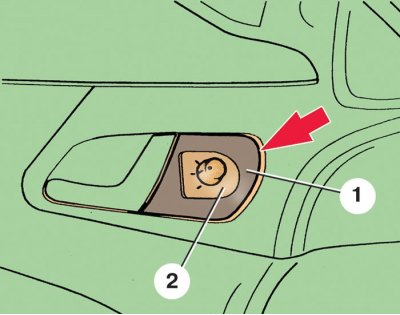
1 – decorative overlay; 2 – switch
1. Disconnect the wire from the "-" terminal of the battery.
2. Using a screwdriver, remove the decorative trim 1 (see figure Removing and installing the electric outside mirror switch) together with switch 2.
3. Disconnect the wiring harness from the switch.
4. After releasing the latches, remove the switch from the decorative cover.
5. Install the switch in reverse order.
Side console
Removal the side console
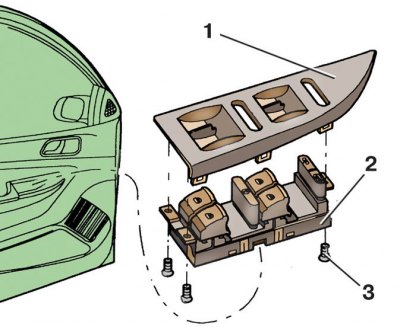
1 – decorative overlay; 2 – side console with switches; 3 – screws
1. Disconnect the wire from the "-" terminal of the battery.
2. Using a screwdriver, remove the decorative trim 1 (see figure Removing the side console) together with side console 2.
3. Disconnect the wiring harness from the side console 2.
4. Loosen screws 3 and remove decorative trim 1 from side console 2.
5. Install the side console in reverse order.
Central light switch panel
Removal the central light switch panel
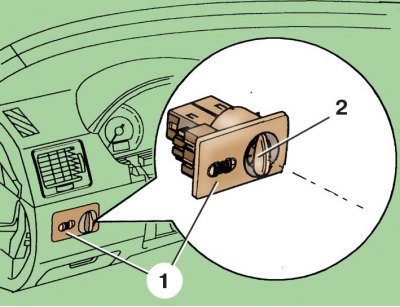
1 – panel; 2 – central light switch handle
Removal the headlight range control and instrument lighting switch unit
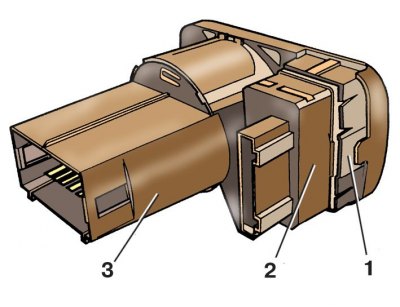
1 – latch; 2 – switch block; 3 – central light switch
1. Disconnect the wire from the "-" terminal of the battery.
2. Install handle 2 (see figure Removing the central light switch panel) to position "0".
3. Press handle 2 down, turn it to the vertical position and pull out the panel with switches.
4. Disconnect the two wire connectors.
5. To remove block 2 (see the figure Removing the headlight range control and instrument lighting switch unit) headlight range control and instrument lighting switches, press the plastic latch 1.
6. Install the center switch panel in reverse order.