



Contents: Controls ⬇ Outside temperature ⬇ Time of movement ⬇ Current fuel consumption ⬇ Average fuel consumption ⬇ Power reserve ⬇ Mileage ⬇ Average speed ⬇ Warning when exceeding the speed…⬇ Setting the speed limit while driving ⬇
Controls
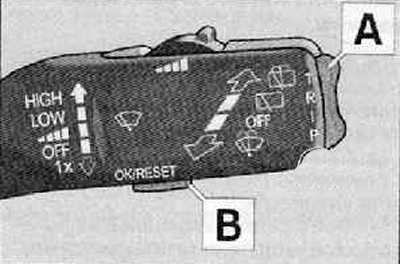
Button A and button B are located on the windshield wiper lever.
Switching and returning to the multifunction steering wheel is carried out using the D control.
Memory selection
Briefly press button B on the windscreen wiper stalk or button D on the multifunction steering wheel to select the desired memory bank.
Selecting a function using the wiper lever
Briefly press the A key up or down. This will call up individual functions of the on-board computer in sequence.
Reset
- Select the desired memory bank.
- Press and hold the B key for more than 1 second.
Button B on the windshield wiper lever resets the following parameters of the selected memory bank:
- average fuel consumption,
- the path traveled,
- average speed,
- time of movement.
Outside temperature
The outside temperature value is displayed on the display when the ignition is on.
If the temperature drops below +4°C, a snowflake symbol appears in front of the temperature indicator (ice warning signal) and a warning signal sounds After pressing button A on the windscreen wiper lever or button C on the multifunction steering wheel, the last displayed parameter is displayed
Attention. If there is a possibility of black ice on the street, do not rely only on the information on the outside temperature indicator. Remember: the fact that the device does not show the danger of black ice does not mean that there is no black ice. Icing of the road is possible even at a temperature of about +4°C. Warning about black ice!
Time of movement
The display shows the travel time that has passed since the memory was reset. If you want to start counting the travel time from a certain moment, you need to reset the memory to that moment. To do this, press and hold the B button on the windshield wiper lever for more than 1 second.
The maximum value for both memory banks is 19 hours and 59 minutes and for vehicles with an information display • 99 hours and 59 minutes. If this value is exceeded, the displays are reset again.
Current fuel consumption
The display shows the instantaneous fuel consumption in l/100 km. This parameter allows you to adjust your driving style taking into account fuel consumption.
(Text copied from this resource skodabook)
When the vehicle is stationary or moving slowly, fuel consumption is displayed in l/h.
Average fuel consumption
The display shows the average fuel consumption in l/100 km, determined since the last memory reset. Displaying this parameter allows you to adjust your driving style taking into account fuel consumption.
If you want to measure the average fuel consumption over a certain period of time, before starting the measurements, you must reset the memory using the B button on the windshield wiper lever. After erasing the parameter, dashes are displayed on the display for the first 100 m of the journey. The displayed value is constantly updated while driving.
Note: The amount of fuel consumed is not displayed.
Power reserve
The display shows the range in kilometers. This parameter indicates how far your car can travel on the remaining fuel while maintaining the current driving style. This parameter changes in 10 km increments. After the fuel reserve indicator lamp lights up, the indication changes in 5 km increments.
When calculating the power reserve, the fuel consumption over the last 50 kilometers is taken as a basis. If you reduce fuel consumption, the power reserve will increase. When resetting the memory (after disconnecting the battery), the range is calculated based on a fuel consumption of 10 l/100 km; this value is subsequently changed according to the driving style.
Mileage
The display shows the distance travelled since the memory was last reset. If you want to measure the distance travelled over a certain period of time, you must reset the memory using button B on the windscreen wiper lever before starting the measurement. The maximum display value for both memory banks is 1,999 km, or 9,999 km for vehicles with an information display. If this value is exceeded, the indicators are reset again.
Average speed
The display shows information about the average speed in km/h since the last memory reset. If you want to measure the average speed for a certain period of time, you must reset the memory using the B button on the windshield wiper lever before starting the measurements.
After deleting the parameter, dashes are displayed on the display for the first 300 m of the journey. The displayed value is constantly updated while driving.
Warning when exceeding the speed limit
Setting the speed limit on a stationary vehicle
- Use button A on the windscreen wiper lever to select the menu item. Warning when exceeding the speed limit.
- Use the B button on the windscreen wiper lever to activate the speed limit setting (the value starts blinking).
- Use button A on the windscreen wiper lever to set the desired speed limit, for example 50 km/h.
- Use button B on the windscreen wiper lever to confirm the set value or wait about 5 seconds for the new setting to be saved automatically (the value will stop blinking).
The speed limit changes in 5 km/h increments.
Setting the speed limit while driving
- Using button A on the windscreen wiper lever, select the menu item "Warning when exceeding the speed limit".
- Drive at your desired speed, for example, 50 km/h.
- Using the B button on the windscreen wiper lever, enter the current speed as the maximum speed (the value starts blinking).
If you want to change the configured speed limit, the change occurs in 5 km/h increments (for example, the accepted speed of 47 km/h is increased to 50 km/h or decreased to 45 km/h).
- Press button B on the windscreen wiper lever again to confirm the set value or wait about 5 seconds for the new setting to be saved automatically (the value will stop blinking).
Changing and resetting the speed limit
- Using button A on the windscreen wiper lever, select the menu item "Warning when exceeding the speed limit".
- Pressing button B on the windscreen wiper lever removes the speed limit.
- Pressing the B button on the windscreen wiper lever activates the ability to change the speed limit.