



Contents: Control using the buttons on the…⬇ Control using the buttons on the…⬇ Settings ⬇ Language ⬇ Lighting and visibility ⬇
Caution: When in contact with the display (for example, when wiping it) remove the ignition key from the lock to prevent damage.
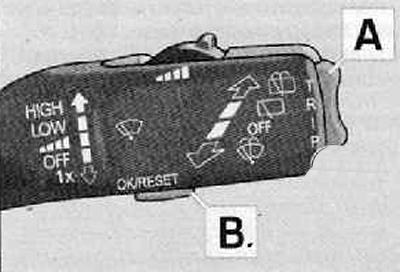
Control using the buttons on the windshield wiper lever
- Main menu (Main menu) is called by pressing the A key for more than 1 s.
- The A key can be used to select the desired menu item. After briefly pressing the B key, the selected information is displayed.
Control using the buttons on the multifunction steering wheel
- Main menu (Main menu) is called by pressing the A key for more than 1 s.
- Using the A key, you can select individual menu items.
- After briefly pressing the knob B, the selected menu item is displayed.
You can choose (depending on the vehicle configuration) the following parameters:
- MFD (Multifunctional display).
- Audio (Audio).
- Navigation.
- Phone (Telephone).
- Aux. heating (Autonomous heater).
- Assistants (Auxiliary devices)).
- Vehicle status (Vehicle status).
- Settings.
The Audio and Navigation menu items are only displayed if the vehicle is factory equipped with a head unit or radio navigation system.
Aux. heating menu item (Autonomous heater) displayed only if the vehicle is factory equipped with an independent heater.
Assistants menu item (Auxiliary devices) only displayed if the vehicle is factory equipped with adaptive lighting.
Note: If you are not using the information display, the menu will automatically move up to the next higher level every 10 seconds.
Settings
You can change some settings using the information display. The current setting is shown on the information display in the top line of the relevant menu under the line.
You can choose (depending on the vehicle configuration) the following parameters:
- Language (Language / Lang.).
- MFD Data (On display).
- Convenience.
- Lights & Vision (Lighting and overview).
- Time.
- Winter tyres (Winter tires).
- Units (Unit of measurement).
- Assistants (Assistants).
- Alt. speed dis. (Second speed.).
- Service (TO).
- Factory Setting (Factory settings.).
- Back.
After selecting the Back menu item, you move up one menu level.
Language
Here you can set the language in which warning and information messages are displayed.
MFA indication
Here you can turn on or off individual indicators of the on-board computer
Comfort
Please note: Depending on the configuration and year of manufacture, the data below may differ from that of a specific vehicle.
Here you can enable, disable or configure the following functions:
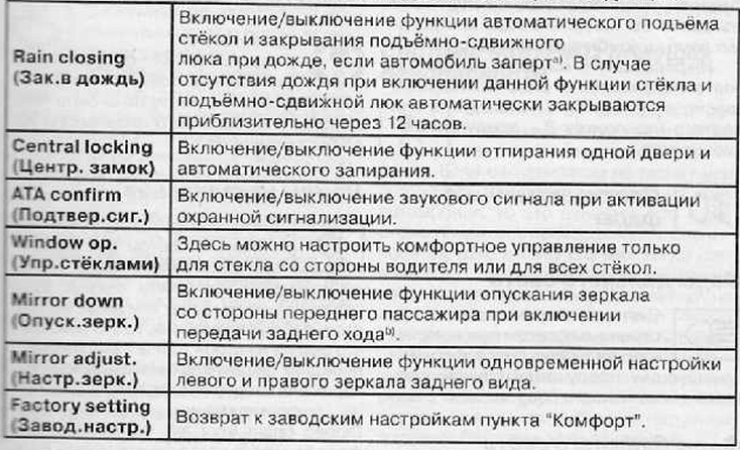
1)This function is only available in vehicles with a rain sensor.
2)This feature is only available on vehicles with electric driver's seat adjustment.
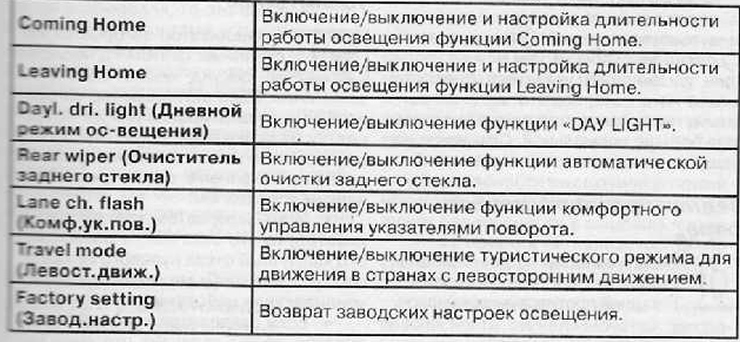
Lighting and visibility
Here you can enable, disable or configure the following functions:
Current time
Here you can set up the clock, select the time display format (12 or 24 hours) and switch summer/winter time.
Winter tires
Here you can set the speed value at which a warning signal should sound. This function is used, for example, when using winter tires, for which the permissible speed is lower than the maximum speed of the car.
When this speed value is exceeded, the information display shows:
Snow tyres max. speed... km/h (Winter tires max speed... km/h).
Units of measurement
Here you can set the units of measurement for temperature, fuel consumption and distance traveled
Assistants
Here you can configure the sound signals of the parking assistant.
Second speed indication
Here you can turn on the indication of the second speed in miles/hour or km/h, respectively.
THAT
In this section, you can enable the display of the remaining distance to the next maintenance in kilometers or the period in days and reset the maintenance frequency indicator.
Factory setting
After selecting the Factory setting menu (Factory settings.) the information display is reset to factory settings.