



Main menu
Menu item call key: Assistants on the steering column switch
Main menu items
You can choose (depending on the vehicle configuration) the following parameters: On-board computer, Assistants, Navigation, Audio system, Telephone, Car, Timer.
Menu item: Assistants
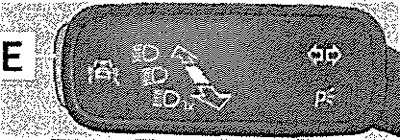
In the menu section Assistants, the Cont, Dist, and Dv. by Lane system can be activated or deactivated by confirmation. The Assistants item in the main menu can be called up directly by pressing the E button on the steering column switch.
Note: If warnings are displayed on the MAXI DOT display, they must be acknowledged to display the main menu.
Timer (Stopwatch)
The Lap Timer function measures how long it takes a car to complete one lap of a race track. The measured time is displayed on the display. Results are displayed in minutes, seconds and tenths of a second.
Starting the Lap Timer function
Select the Timer item in the main display menu. The following functions are available: Start - manual start of time measurement or resumption of an interrupted measurement; With start-up moment - automatic start of time measurement when starting off; Statistics - analysis and reset of measurement results.
Measurement
Starting a measurement manually
Select Lap Timer - Start from the menu.
Automatic start of measurement
Select the Lap timer with start moment item in the menu. The measurement starts automatically when you start moving.
Start timing for the next lap
During the measurement, select the New lap item in the menu. During the measurement, the display shows the time of the fastest and last completed lap.
[Material is available on the website SkodaBook.ru]
Measuring the intermediate result
During the measurement, select the menu item Intermediate time. The display shows the intermediate result for about 5 seconds. You can take intermediate readings multiple times during the passage of one lap.
Measurement interruption
During the measurement, select the Stop item in the menu. The measurement is interrupted and the following functions can be selected: Continue — continue the current measurement; New circle - start the next dimension; Mark circle - cancel measurement (the result of the interrupted measurement is deleted from memory); I will assure you - complete the measurement (the result of the interrupted measurement is saved in memory).
Analysis of results
Select the Lap Timer - Statistics menu item. The following data is displayed: Best: - the lap with the best time; Worst: - lap with the worst time; Average: - average result of passing one lap; Total time: - the total time it takes to complete all laps.
Resetting results
Select the menu item Lap Timer - Statistics - Reset.
Note: The system allows you to measure up to 11 results. The measurement of individual lap times ends after 99 hours, 59 minutes and 59 seconds. From this point in time, the new lap times are automatically changed. The individual results are not reset. If the results have not been reset, they remain in the memory even after the ignition is turned off.