



Caution: Do not be distracted by the display if the traffic situation does not allow it.
The instrument cluster can be equipped with a 240-segment or graphic (166x110) display. Depending on the vehicle configuration, the display is designed to display the following information:
- • odometer;
- • resettable odometer;
- • time;
- • outside air temperature;
- • position of the selector lever for models with DSG;
- • recommendation for choosing a gear;
- • current speed of the vehicle;
- • information messages;
- • audio/navigation system and telephone data;
- • warnings about dangerous situations;
- • warnings about malfunctions in the operation of vehicle components and systems;
- • settings menu (see subsection below);
- • maintenance information;
- • system information "Start-Stop" (see Section 18);
- • trip computer data (see subsection below).
If a malfunction of the instrument cluster is detected, the message "Error" appears on the display.
The odometer shows the total distance traveled by the vehicle. Resetting this counter is not permitted. If the second speed display is activated, it replaces the odometer reading.
A resettable trip counter (trip) counts the mileage to within 100 m from the last time it was reset. To reset this meter, use the right button of the instrument panel (see above): hold it for about a second. If a second speed indication is activated in a vehicle equipped with an information display, this indication is displayed instead of the resettable mileage counter.
Setting the time on the clock is done using the keys on the instrument cluster (see subsection above).
The outside air temperature is only displayed when the ignition is on. When the vehicle is stationary or moving at very low speeds, the reading may be slightly higher than the true value due to the influence of thermal radiation from the engine. At temperatures below +4°C, a snowflake symbol appears next to the temperature reading, warning of the possibility of ice forming on the road.
Note: Ice formation, especially on bridges, is possible even at low positive temperatures, at which the ice warning does not work. Therefore, do not rely entirely on the ice warning.
The position of the selector lever on models with DSG is indicated as on the side of the lever (see Section 23), and in the upper right corner of the instrument cluster display. In manual "Tiptronic" mode, the display also shows the gear engaged (e.g. "D4").
On some models with manual transmission, the current gear and a recommendation for changing gear to save fuel are displayed in the upper right corner: up/down arrow - recommendation for upshifting/downshifting (if there is an arrow next to it, the recommended gear is displayed).
Note: Regardless of the gear shift recommendation, the driver always remains responsible for controlling the vehicle.
The current speed indication can be displayed on the screen in addition to the speedometer readings in the same or other units of measurement (mph or km/h). The current speed indication is included in the set of functions of the trip computer. On models with a multifunctional display, the speed indication is enabled via the "Settings→Second speed indication" menu of the display.
Warnings about malfunctions in some vehicle components and systems are given in the form of flashing or continuously illuminated red or yellow pictograms with explanatory messages, which in some cases are accompanied by an audible signal. Warnings with the highest priority have red pictograms; if such a warning is present, the vehicle should be stopped at the first opportunity, the operation of the system in question should be checked and the fault eliminated, or technical assistance should be called. Higher priority warnings are accompanied by three audible signals. Lower priority warnings have yellow pictograms; if such a warning is present, the operation of the corresponding system should be checked as soon as possible or the corresponding fluid should be topped up. Lower priority warnings are accompanied by a single audible signal. Depending on the instrument cluster version, the warning indication may vary. If the display does not provide for warning and information messages, then only the indicator lamps will indicate malfunctions. If there are several warnings, the corresponding pictograms will appear one after the other at intervals of several seconds. These pictograms will be displayed until the causes for their appearance are eliminated. The presence of at least one warning can be judged by the presence of the "Vehicle status" item in the display menu in the instrument cluster. If there are several messages, the number of the current message and the total number of messages are indicated when viewing them.
Maintenance indicator
The service indicator only informs you about the service due date when the engine oil should be changed. Information about the due dates of other types of service (for example, replacing brake fluid) is indicated on the sticker on the left end of the instrument panel or in the service book. When the time for maintenance approaches, a reminder of the upcoming service appears when the ignition is turned on: the instrument cluster display shows a pictogram in the form of a wrench and the mileage until the upcoming maintenance rounded up to 100 km. After a few seconds, a pictogram in the form of a clock and the number of days until the upcoming maintenance appears. On models with the ability to display text messages on the instrument cluster display, a reminder of the upcoming maintenance is issued in the form of the message "Maintenance in --- km or --- days." The maintenance message disappears after a few seconds.
After the maintenance deadline, when you turn on the ignition, a wrench icon will flash on the display for 20 seconds, or the message "Maintenance now!" will appear.
A request for an upcoming maintenance can be made with the engine turned off and the ignition on, but not earlier than 500 km after the maintenance (before that, dashes will be displayed). To do this, press the left key of the instrument cluster until a wrench icon appears on the display. You can also select the menu item "Settings → Service info → Information". If the maintenance is overdue, the mileage and time until maintenance are displayed with a minus sign, or the message "Maintenance overdue --- km, or --- days" is displayed.
If the service was not carried out at a Skoda service station, the service indicator should be reset as follows. On models with a segment display, while the service due date is displayed, press and hold the right "0.0" button on the instrument cluster. On models with a graphic display, select the menu item "Settings→Service info→Restart" and confirm the request by pressing the "OK" button. Note: Do not reset the service indicator between engine oil changes, as this will display incorrect information about the next service.
After disconnecting the vehicle battery, the maintenance indicator readings remain.
If the car is serviced under the program "Long Life service" (see Section 3 Chapter 1), then after resetting the maintenance indicator in the manner described above, a transition to maintenance according to a program with fixed time or mileage intervals occurs, i.e. individual operating conditions of the vehicle will not be taken into account when calculating the maintenance time.
Trip computer
The trip computer is controlled by the keys on the right steering column switch and, if available, on the right spoke of the steering wheel (see illustration 13.2):
- • "TRIP" (A) - to switch between menu items/trip computer readings, change the value of the selected parameter, and also to enter the main menu (when holding);
- • "OK/RESET" (B) - to confirm viewing of a message, confirm selection of a menu item, selection of a trip computer memory cell (multiple press) and its purification (long press):
- • "O" (C) - button to return to the previous menu (with a short press) or to the main menu (when holding), and also call the trip computer menu;
- • buttons with triangular up/down arrows (D) - to switch between menu items, change the value of the selected parameter, and also to select a trip computer memory cell (move up/down), confirm selection (multiple press) and reset readings (long press) trip computer.
The trip computer has two automatic storage devices.
- • No.1 - memory for a single trip. This memory records driving characteristics and fuel consumption data from the moment the ignition is turned on until the moment it is turned off. If driving is stopped for more than two hours, the contents of the memory are automatically deleted. If the trip is resumed within two hours after the ignition is turned off, the new data is added to the previous data.
- • No.2 - memory for all trips. It records the characteristics of any number of individual trips. Depending on the instrument cluster version, data is saved for a total travel time of up to 19-59 minutes or up to 99-59 minutes, as well as for a total mileage of up to 1999 km (miles) or up to 9999 km (miles). If one of these limits is exceeded, the memory contents are automatically deleted and the recording starts from zero.
The number of the displayed memory device is indicated in the upper right corner of the central field of the display. To switch from the currently displayed memory device to another, with the ignition on, briefly press the key (In illustration 13.2) or tilt switch (D) up/down. To clear the selected memory, with the ignition on, press button (B) or switch (D) for more than a second. All data in both memories is erased when the battery is disconnected. To display the desired trip computer reading, switch on the ignition, select the desired memory and press the upper or lower side of the "TRIP" button on the right steering column switch. If the buttons on the steering wheel are used, first press button (C) to call up the trip computer menu, then tilt switch (D) up or down to highlight the desired item and confirm the selection by pressing switch (D). After switching on the ignition, the trip computer reading that was displayed before the ignition was switched off is displayed.
The trip computer allows you to view the following information on the instrument cluster display.
Outside air temperature (see subsection above);
Trip Time - Trip time in hours and minutes since reset.
Current (instantaneous) fuel consumption is displayed in l/100 km or miles/gallon while driving, and in l/hour or gallons/hour while stationary with the engine running. The readings are updated every 0.5 seconds.
Average fuel consumption (l/100 km or miles/gallon). Only displayed after approximately 100 m of travel since the last reset. Before that, dashes are shown instead of the value. The readings are updated every 5 seconds.
Power reserve - approximate distance (km or miles), the distance a vehicle can travel with the fuel in its tank while driving in its current mode; for the calculation, among other parameters, the average fuel consumption over the last 50 km is used. After resetting the average fuel consumption, the power reserve is initially calculated based on an average consumption of 10 liters per 100 km. With a normal fuel reserve, the reading is rounded up to 10 km, and with a reserve fuel reserve - up to 5 km.
Mileage - length of the path (km or miles), traveled by the car after the reset.
Average speed (km/h) is only displayed after approximately 300 m of travel since the last reset. Before that, dashes are displayed instead of the value. The readings are updated every 5 seconds.
Digital speed display - digital display of current speed (km/h or mph).
Digital oil temperature display - digital display of the current engine oil temperature. When the oil temperature is less than 50°C or there is a problem with the oil temperature control system, dashes are displayed instead of a digital value.
Warning at --- km/h an audible signal and, in some cases, a visual warning when the set speed is exceeded (see subsection below).
On models with a display that can display text messages, you can select the data that will be displayed by the trip computer via the "Settings→Display data" menu.
Speed Warning
To activate the warning when the vehicle is stationary, select this item and press the button (In illustration 13.2) or on the switch (D), - the speed value will start flashing. After that, use the switch (A) or (D) to set the desired speed value (in 5 km/h increments) and confirm the entry, or wait 5 seconds until the reading stops flashing.
To activate the warning while driving, select this item and press the button (In illustration 13.2) or on the switch (D), - the current speed will be accepted as the set maximum. If necessary, for some time after this, the switch (A) or (D) can be used to correct the set value in 5 km/h increments, after which you should press the key (B) or the switch (D) again, or wait 5 seconds until the display stops flashing.
The set speed limit is maintained even after the ignition is turned off.
To reset the set maximum speed value, press the key (B) or the switch (D) - the saved set value is deleted. After pressing again, the speed value can be changed.
Display menu
The trip computer is controlled by the keys on the right steering column switch and, if available, on the right spoke of the steering wheel (see illustration 13.2).
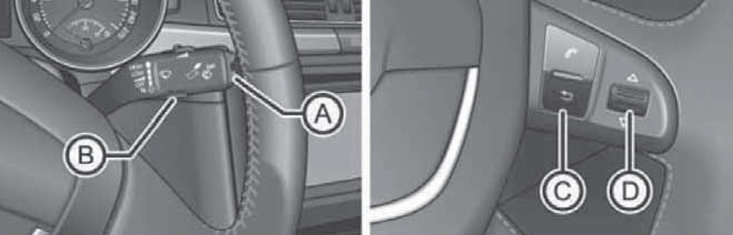
13.2 The "TRIP" (A) and "OK/RESET" (B) buttons on the right steering column switch, as well as the buttons (C and D) on the right spoke of the steering wheel
To call up the main menu, turn on the ignition. If any message or icon appears, hold down the button (A or C in Illustration 13.2). By pressing the upper or lower side of the switch (A or D) repeatedly, you can highlight the desired menu item and then select it by pressing the key (B) or the switch (D).
The menu content depends on the vehicle configuration. At the Skoda service station, new menu functions can be programmed for some models or existing functions can be changed.
Some menu items can only be called up when the vehicle is stationary. In addition, if a warning message of the highest priority (see above) is present, no menu items can be displayed.
The display menu in the maximum configuration contains the following items:
Multifunctional display - trip computer (see subsection above).
Audio - indication of the data of the received radio station or the CD/other media being played (see Section 15).
Navigation - information about the enabled navigation system (see Section 15).
Phone - information and setup of the mobile phone connection kit (see Section 15).
Autonomous heater - switching on/off, setting the switching time and setting the operating mode (see Section 14). The following submenus are available.
Activation.
- Program on/off - heater on/off indicator.
- Switch-on time 1/2/3 - selection of automatic switch-on time.
- Deactivate - disable automatic activation.
Switch-on time 1/2/3 - setting the switch-on time options for subsequent selection in the "Activation" submenu.
- Day of the week - specify the days of the week for the selected switching time (if an empty line between Sunday and Monday is selected, the activation occurs every day).
- Hours/minutes - indicates the time of switching on.
- Activation - activation of the autonomous heater with the entered switching time without going to the "Activation" submenu.
Operating time - duration of heater operation, from 10 to 60 minutes, in 5-minute increments.
Working hours (heating or ventilation).
Day of week - sets the current day of the week.
Factory setting - setting the factory settings for the "Additional, heater" menu.
Back - return to the main menu.
Vehicle status - existing warnings about malfunctions in some vehicle units and systems (see above). The number of the viewed warning/total number of warnings is also displayed. If there are no warnings, this item is missing.
Settings - settings for various functions. The following submenus are available.
Language - select the language for text messages on the display and navigation system.
Auto. blind - switching on/off the automatic retraction of the luggage compartment blind when the tailgate is raised (only on Combi models, see Section 12);
MFA indication - selection of data displayed by the trip computer (see subsection above).
Comfort - switching on/off and setting up comfort systems and functions.
- Rain Lock - Turns on/off the automatic closing function of the windows and sunroof when rain is detected while the car is locked (only on models with rain sensor). If this function is enabled, the windows and sunroof will also close 12 hours after the car is locked, if it has not rained during this time.
- Confirmed signal (see Section 6) - turn on/off the sound signal to confirm the activation of the anti-theft alarm.
- Central Castle (see Section 1). Manually - the algorithm of operation of a single lock when unlocking with a key fob (all doors, one door, one side of the car, individually). Automatic - settings for automatic unlocking and locking of a single lock (automatic locking, automatic unlocking). Also applies to the "KESSY" system.
- Glass control (Off/Select All/Driver) - setting up the algorithm for the electric window lifter when unlocking and locking the car (see Section 5).
- Mirror down - turns on/off the movement of the right rearview mirror to a preset position when reversing (only on models with electric adjustment of the driver's seat, withm. Section 9).
- Mirror settings. (Separately/Synchronization) - selection of the operating algorithm of the electric drive for adjusting the outside mirrors (see Section 9).
- Factory settings - sets the factory parameters for some items in the "Comfort" submenu. The display shows "Factory, comfort settings returned".
Lighting and overview - switching on/off and setting up the functions of lighting devices.
- Coming Home - enable/disable function "Coming Home" (see Section 12) and setting the time of lighting operation after locking the car.
- Leaving Home - enable/disable function "Leaving Home" (see Section 12) and setting the time of lighting operation after locking the car.
- Footwell lighting - turns on/off the footwell lighting and adjusts its brightness.
- Daytime running light mode - turn on/off the DRL function (see Section 12).
- Rear wiper - turns on/off the automatic rear window wiper function (see section 12).
- Comfort turn signal - turns on/off 3-times flashing of direction indicators when pulling the left steering column switch up or down to the locking point (see Section 12).
- Left-hand traffic - turns on/off the headlight settings for using the vehicle in a country with traffic on the other side of the road.
- Factory settings - sets the factory parameters of the "Lighting and visibility" submenu items.
Time - Sets the time on the clock in the instrument cluster and in the navigation system. The time can be displayed in 12-hour or 24-hour format. The S symbol at the top of the display indicates that daylight saving time has been set.
Winter tires - Sets the sound signal and text message to warn you when you exceed the speed limit. Use this feature only if you have winter tires that are not rated for the vehicle's maximum speed.
Units of measurement - select units of measurement for temperature, fuel consumption and distance.
Assistants - setting the tone of the sound signal for parking assistance systems.
Second Speed (On/Off) - turns on/off the second indication of the vehicle speed in other units of measurement, only for models for countries with the imperial system of measures.
TO - request information about the timing of the maintenance or reset the TO indicator (Information, Reset).
Factory Default - sets the factory settings for the Setup menu items.
Back - go to the main menu.
The menu items "Audio", "Navigation" and "Add. heater" are displayed only if the corresponding system is installed at the factory and switched on (except for the "Add. heater" menu).