



 .
.
Caution! When driving on very steep slopes, the cruise control cannot maintain a constant speed. The vehicle speed increases due to the weight of the vehicle. In such cases, shift to a lower gear or brake the vehicle with the brake pedal. Cruise control does not engage if first gear or reverse gear is engaged (with manual transmission). Cruise control cannot be engaged if the automatic transmission selector is in position P, N, or R (vehicles with automatic transmission). Cruise control can be automatically deactivated when systems using the brakes are activated, (for example, ESC), in case of exceeding the maximum permissible engine speed, etc. Cruise control remains on even after gear shifting!
Turn on/off
Steering column switch: cruise control controls
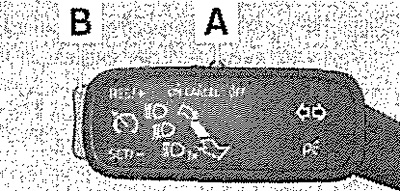
Activation
Turn switch A to the ON position.
Deactivation
Turn switch A to the OFF position.
Memory retention and speed maintenance
Activate cruise control. Develop the desired speed. Press button B to the SET/- position. After releasing button B from the SET/- position, the stored speed is maintained without pressing the accelerator pedal.
Changing the speed stored in memory
Increase speed with the B key
Press the B key to the RES/+ position. When you hold the key in the RES/+ position, the speed increases continuously. After reaching the desired speed, release the key. The new speed value will be written to the memory.
Decrease speed with the B key
By pressing the B key in the SET7 position, the recorded speed value can be reduced. When holding the key in the SET/- position, the speed is continuously reduced. After reaching the desired speed, release the key. In this case, the new speed value will be recorded in the memory. If you release the key at a speed of less than 25 km/h, the speed value is not recorded and the memory contents are erased. It is necessary to re-save the speed after it exceeds the 25 km/h value by pressing the B key in the SET/- position.
The original article is available on [SkodaBook]
Increasing speed using the gas pedal
Press the gas pedal. After releasing the pedal, the speed decreases to the value stored in the memory.
Reducing speed using the brake pedal
The speed can be reduced by pressing the brake pedal, which will temporarily disable the system.
Temporary shutdown
Cruise control can be temporarily deactivated by moving switch A to the spring-loaded CANCEL position or by pressing the brake pedal. The speed stored in memory is retained. To restore the set speed after releasing the brake pedal, briefly press button B to the RES/+ position.
Display indication
Instrument cluster display: examples of cruise control status indication
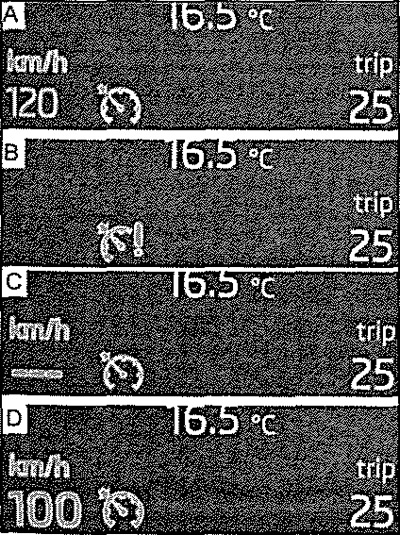
- A. Cruise control is temporarily disabled
- B. System malfunction. Contact your nearest service station for assistance
- C. Speed value is missing from memory
- D. Cruise control is on