



Contents: Instructions and messages ⬇ Location of the radar sensor ⬇ Proximity Warning ⬇ Advance warning ⬇ Active warning ⬇ Automatic braking ⬇ Braking support ⬇ Turn on/off ⬇ Turning Front Assist on/off ⬇ Turning the proximity warning…⬇ Activate or deactivate the…⬇ "Automatic emergency braking system"…⬇ Display instructions ⬇ "M" Front distance control: cross.…⬇ "M" Front Assist not working ⬇
Front Distance Control System (next: Front Assist) warns of the risk of collision with an obstacle in front of the car. To avoid it or reduce the severity of the consequences, it automatically brakes the car.
Instructions and messages
The following conditions may prevent Front Assist from working: poor visibility (fog, rain, heavy snowfall, etc.); movement in a "sharp" turn; with the gas pedal pressed all the way down; in case of a malfunction of the Front Assist system; when dynamic control systems using braking mechanisms are activated (for example, ESC).
Please note: For safety reasons, Front Assist must be deactivated in the following situations: when being towed; when the car is on a roller test stand; if its unwanted activation is repeated; transportation of vehicles by ferry, truck, rail, etc. Small vehicles and vehicles moving between two lanes are recognized by the system only when they enter the radar sensor's coverage area. This is especially true for narrow vehicles such as motorcycles. If more than one brake light on the vehicle itself or on its trailer fails, Front Assist stops working.
Location of the radar sensor
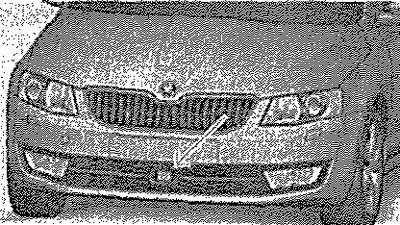
Radar sensor (next: sensor) monitors the traffic situation in front of the car. The sensor emits electromagnetic waves and distinguishes objects by their reflection. The following conditions may interfere with the sensor's operation: the sensor is under a layer of dirt or snow, the sensor is blocked (for example, with a sticker), poor visibility (fog, rain, heavy snowfall, etc.). If the sensor is dirty or for some other reason does not "distinguish" objects, the following message appears on the display in the instrument cluster. "M" Distance control front: overlapping sensor.
Stop the car, turn off the engine and clean the sensor or remove obstacles that interfere with it. If Front Assist still does not work after starting the engine, contact a service station.
Caution! Use a broom to remove snow from the sensor and a solvent-free de-icing spray to remove ice.
Instrument cluster display: indication (dangerous approach)/preliminary warning or activation of the emergency braking function in city mode.
When driving on the motorway, Front Assist helps the driver in the following ways: Draws attention to a dangerous approach to a vehicle moving in front. Warns of a risk of collision. If a danger is detected, prepares the brake system for emergency braking. Supports the driver's braking. If the driver does not react to the danger, the brakes are applied automatically. Front Assist only works under the following conditions: Front Distance Control (Front.Assist) included; adaptive cruise control is on; the car is moving at a speed of more than 5 km/h.
Proximity Warning
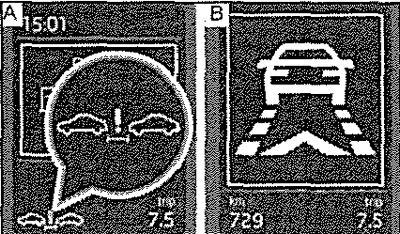
If the time interval to the vehicle ahead becomes dangerously short, the symbol appears on the display - Fig. A. The driver must immediately restore a safe distance, taking into account the current traffic situation! The distance at which the warning appears depends on the speed of the vehicle. The warning may appear at speeds from 60 km/h to 210 km/h.
Advance warning
When the Front Assist distance control system detects a risk of collision with a vehicle moving in front, a corresponding symbol appears on the display and an audible signal sounds - Fig.
B. At the same time, the brake system prepares for possible emergency braking. A preliminary warning may appear at a speed of 30 km/h to 210 km/h. Press the brake pedal or go around the obstacle!
Active warning
If the driver does not respond to the first warning, the system applies short-term sharp braking by acting on the brakes, which is felt as a jerk, which is intended to once again warn the driver of the risk of a collision.
Automatic braking
If the driver does not respond to the active warning, the car system automatically applies the brakes in several stages with increasing braking force. By reducing the speed, Front Assist helps reduce the severity of a possible accident.
Braking support
If the driver does not brake hard enough when there is a risk of a collision, Front Assist increases the braking force to minimise the consequences of a potential accident. Braking support is provided only as long as the driver presses the brake pedal hard enough.
Caution! Automatic braking initiated by Front Assist can be interrupted by pressing the clutch or accelerator pedal or by turning the steering wheel. If Front Assist has initiated automatic braking, the brake pressure increases and the pedal travel is changed.
Turn on/off
The Front Assist system is automatically switched on when the ignition is turned on. Switching off the Front Assist system should only be done as an exception.
Turning Front Assist on/off
The Front Assist function can be activated or deactivated in the infotainment system or in the MAXI DOT display. The proximity warning and pre-warning functions are also deactivated together with the system.
Turning the proximity warning function on/off
The proximity warning function can be activated or deactivated in the Infotainment system. The selected function status is also retained after the ignition is switched off and then on again.
Activate or deactivate the pre-warning function
The pre-warning display can be activated or deactivated in the Infotainment system. The selected function status is also retained after the ignition is switched off and then on again.
"Automatic emergency braking system" in urban conditions
Emergency braking function in city mode (further in the text briefly: emergency braking function) is part of the Front Assist system. The emergency braking function helps the driver in the following way. When a hazard is detected, it prepares the braking system for emergency braking. If the driver does not react to the hazard, automatic braking is carried out with a gradual increase in the force of the brake drive. The emergency braking function is activated at a speed of 5 km/h to 34 km/h. The emergency braking function is activated and deactivated automatically together with the Front Assist system. If this function has initiated automatic braking, the symbol appears on the display - Fig. B.
Warning! The emergency braking function can brake the vehicle to a complete stop. If the vehicle starts rolling again after stopping, it must be held in place by pressing the brake pedal. Automatic braking initiated by the function can be interrupted by pressing the clutch or accelerator pedal, or by turning the steering wheel. If the function has initiated automatic braking, the pressure in the brake drive increases and the pedal travel changes.
Material published on the website (www.SkodaBook.ru)
Display instructions
Messages and instructions are displayed on the instrument cluster display.
"M" Front distance control: cross. sensor.
The sensor is dirty or blocked. Stop the car, turn off the engine and clean the sensor or remove obstacles that interfere with the "view". If the message appears again after starting the engine, turn off the system. Contact a service station.
"M" Front Assist not working
Stop the car, turn off and start the engine again. If the message appears again after starting the engine, turn off the system. Contact a service station.