



Contents: Operating range of sensors/system…⬇ Infotainment Infotainment System…⬇ Activation/deactivation ⬇ Operation with a trailer ⬇ Automatic activation of the system…⬇ Displaying the trajectory of movement ⬇
Caution! If after activating the system a warning signal is given for about 3 seconds and there are no obstacles near the car, this indicates a malfunction of the system.
Additionally, a malfunction is indicated by a flashing symbol in the key. The Infotainment display shows "1" or...
.
Contact the service station. For the system to function properly, the sensors must be clean (without ice, etc.). Adverse weather conditions (heavy rain, fog, very low or very high temperatures, etc.) may interfere with the normal operation of the system. Additional equipment, such as a bicycle rack, may interfere with the operation of the parking assistant.
Note: The signals of the front parking aid are higher in tone than the signals of the rear parking aid by default. If not all areas around the car are displayed when the system is switched on, the car must be driven forward or backward a few meters. If the system is activated and the automatic transmission selector is in position P (the car cannot move), the sound signal stops and obstacles are not displayed.
Operating range of sensors/system keys
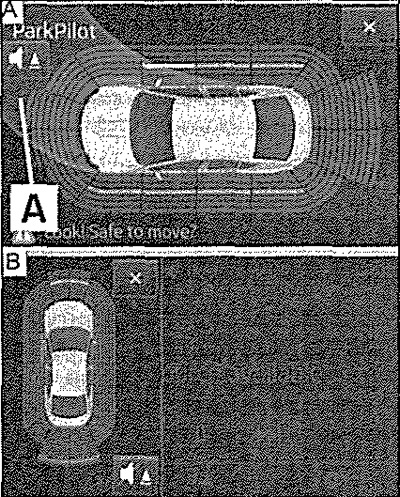
Infotainment Infotainment System Display: Motion path display/Thumbnail image
Parking assistant (further in brief: system) works only when the ignition is on. The system assists the driver with sound signals or an image on the Infotainment display when parking and maneuvering. Using ultrasonic waves, the system calculates the distance from the bumper to the obstacle. Ultrasonic sensors are installed in the rear or front bumpers.
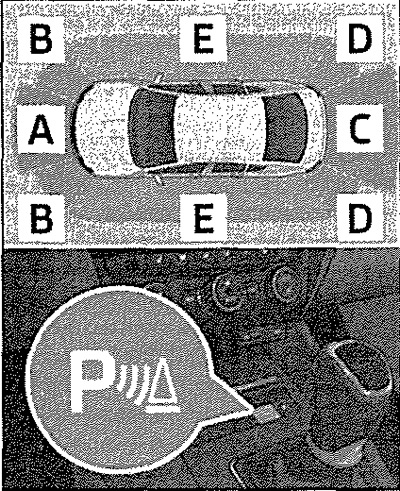
Description of the figure - approximate range of the sensors (cm)
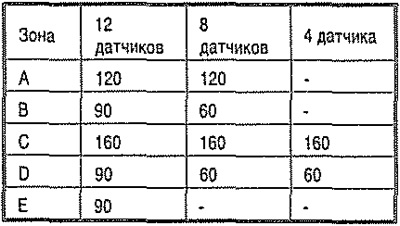
As the distance to the obstacle decreases, the interval between the sound signals decreases. Starting from a distance of about 30 cm, the signal becomes continuous - a dangerous zone. From this point on, you should stop driving). The length of the car can increase when installing a removable towing hitch. Therefore, the dangerous zone for a car with a standard towing hitch begins at a distance of about 35 cm.
Activation/deactivation
The system is activated automatically when reverse gear is engaged, or by pressing a button
 .
.
The symbol lights up in the button, activation is confirmed by a short beep. The parking assistant is switched off together with reverse gear, by pressing the button or automatically when the speed exceeds 10 km/h (the icon in the key goes out). For vehicles equipped with rear sensors only, the system can only be disabled by engaging reverse gear.
(Data copied from the portal: SKODABOOK)
Operation with a trailer
For vehicles with a standard towing device, when towing a trailer, only zones A and B of the system are active, and the trajectory of movement is not displayed.
Automatic activation of the system when moving forward
Automatic activation occurs at speeds below approximately 10 km/h, under the following conditions: the distance to an obstacle in front is less than 90 cm, the distance to an obstacle behind is less than 30 cm, the distance to an obstacle to the side of the vehicle is less than 30 cm. After activation, the following is displayed on the left side of the Infotainment display - Fig. 8. Audible signals are given starting from a distance to an obstacle of approximately 50 cm. The automatic indication function can be activated or deactivated in the Infotainment system.
Displaying the trajectory of movement
The display of the expected travel path changes depending on the rotation of the steering wheel A. Obstacles that are on the travel path are displayed in the following colours: red – distance to the obstacle is less than 30 cm, yellow – distance to the obstacle is more than 30 cm. Obstacles that are not on the travel path are displayed in the following colours: red – distance to the obstacle is less than 30 cm, white – distance to the obstacle is more than 30 cm. The forward travel path is displayed when the forward or neutral gear is engaged, or when the selector is set to position N. The reverse travel path is displayed when the reverse gear is engaged, or when the selector is set to position R.