



Contents: Windscreen: Viewing area of the…⬇ Instrument cluster display: example…⬇ Additional indicator ⬇ Display instructions ⬇ "M" No road signs ⬇ "M" Error: road sign recognition…⬇ "M" Road sign recognition system:…⬇ "M" Road sign recognition system:…⬇
Please note! The traffic sign recognition function only works as an auxiliary device. Real traffic signs always have priority over the signs shown on the display. The driver is always responsible for assessing the traffic situation correctly. In some cases, traffic signs may be recognized by the system with errors or not at all. In this case, the traffic signs may be displayed on the display with errors or not at all. The traffic sign recognition assistant does not issue messages in the event of excess speed and does not adjust the driving speed to the set speed limits.
Windscreen: Viewing area of the traffic sign recognition camera
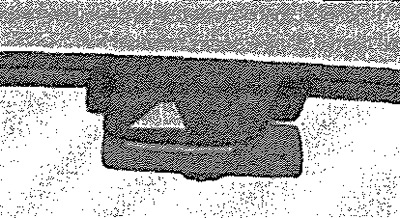
Road Sign Recognition Assistant (further in brief: system) enables the display of recognised road signs with the following meaning on the instrument cluster display: speed limit, no overtaking. In addition to these, additional signs can also be displayed, such as the sign "In wet weather" or road signs with a time limit. The system operates on the basis of data recorded by the camera and only displays those road signs that are in the "field of view" of the camera. The camera data can be supplemented with data from the Infotainment navigation system. Therefore, speed limit signs can also be displayed on sections of the route without installed road signs. The system may have limited availability or be unavailable in the following situations:; poor visibility (fog, rain, heavy snowfall, etc.); the sun gives glare in the camera; the light from oncoming traffic creates glare in the camera; the obstacle is blocking the camera's view; high speed movement; the road sign is completely or partially hidden (for example, trees, snow, mud or other cars); the road sign does not comply with the standard (round with a red stripe along the edge); the road sign is damaged or bent; the road sign is fixed on a flashing light board; the arrangement of road signs has changed (navigation data is out of date).
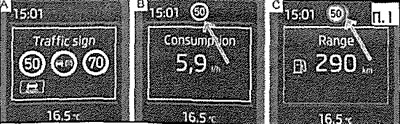
Instrument cluster display: example of road sign display/additional indication (black and white display)/additional indication (color display)
Recognized road signs are displayed on the instrument cluster display: Trip computer, Road signs.
Additional indicator
If the menu item Road signs A is not currently shown on the display, the road sign with the speed limit will be shown in the upper part of the display B, C. If several road signs are detected at the same time, the next road sign C is also partially shown on the colour display. All detected road signs can be displayed under the menu item Road signs A. The additional display of the road sign recognition assistant can be activated or deactivated in the Infotainment system.
Display instructions
Messages and instructions are displayed on the instrument cluster display.
"M" No road signs
No speed limits detected (for example, on a motorway without speed limits).
"M" Error: road sign recognition system
There is a fault in the system. Contact the service station.
"M" Road sign recognition system: clean the glass!
The windshield in the camera's field of view is dirty, iced, or fogged. Clean the windshield or remove the obstruction.
"M" Road sign recognition system: operation limited.
The Infotainment navigation system is not transmitting data. Check whether the maps used by the navigation system are up-to-date or whether the vehicle is located in a location for which navigation data is missing.
[The original article can be found on the resource: SKODABOOK]