



Contents: Mobile Phone Holder (handsfree…⬇ Phone book ⬇ Connecting a mobile phone to a…⬇ Holder and adapter for phone ⬇ Control your phone from the holder ⬇ Controlling your phone via the…⬇ Play music via Bluetooth ⬇ Voice control of the phone ⬇
Mobile Phone Holder (handsfree device) GSM II
Note: The description of the GSM III holder is largely the same as the description of the GSM II holder and is not provided further.
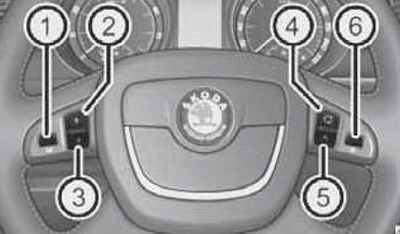
Some trim levels include a mobile phone holder with charging function and voice control and/or SOS emergency call buttons. In this case, the phone can be controlled using the buttons on the multifunctional steering wheel (see illustration 15.1) or via navigation system (voice control). The connection between the mobile phone and its holder is via Bluetooth. The holder is connected to an external antenna.
15.1 Buttons on the multifunction steering wheel (the purpose of the keys is indicated in the table)
Phone book
An integral part of the preparation for a voice-controlled telephone is a "phone book" with 2500 entries. Up to 4 phone numbers can be saved for each contact.
Note: On models with the Columbus navigation system, a maximum of 1200 contacts are displayed on its display.
This phone book can be used regardless of the type of mobile phone. The system starts loading the phone list from the phone and SIM card into the device memory after the first connection of the phone. Each subsequent connection of the phone to the device only updates the contact list, which may take several minutes. During this time, you can use the phone book saved since the last update. Newly saved phone numbers are displayed only after the update is complete. If the phone is activated during the update (for example, incoming or outgoing call, or voice control), the update is interrupted and resumed after the phone is no longer in use.
Connecting a mobile phone to a hands-free device
Note: For details on this operation, refer to the mobile phone's operating manual.
To connect your phone to a hands-free device, you need to create a new profile.
To do this:
- activate Bluetooth and mobile phone detection on your phone;
- turn on the ignition, enter the menu "Phone>Search for phone" and wait for the search to finish;
- in the menu of detected devices, select the desired mobile phone and confirm the PIN code (usually 1234);
- as soon as the hands-free device appears on the mobile phone display (usually "SKODA_BT"), enter the PIN code within 30 seconds (usually 1234) and wait until the connection is established;
- after establishing a connection, confirm the creation of a new user profile on the instrument cluster display.
You can create up to four profiles, but the hands-free device can only connect to one phone. If there is no more free space to create a new user profile, delete the extra user profile. If the connection between the mobile phone and the hands-free device is not established within 3 minutes after turning on the ignition, turn off the ignition and turn it on again (3 minutes will be given again to detect the hands-free device). While establishing a connection, do not connect another mobile phone to the hands-free device.
The Bluetooth device detection function is turned off automatically after the vehicle is driven or when the mobile phone is connected to the device.
Establishing a connection with an already connected phone (having a profile in the hands-free device) is carried out automatically after the ignition is turned on.
Note: Some mobile phones have a position where you can set up code authorization to establish a connection via Bluetooth. If this authorization is enabled, you must enter the PIN code each time you establish a connection. You can check the connection on your mobile phone.
The connection between the phone and the hands-free device is broken by removing the key from the ignition, or through the phone/hands-free device menu.
If the system reports "No connected phones found" check the working condition of the phone (is it turned on, is the PIN code entered, is Bluetooth enabled, is the phone discoverable, has a connection profile been created).
The range of the handsfree device via Bluetooth is limited by the interior of the vehicle and also depends on local conditions (for example, from obstacles between devices and interference from other devices). It is recommended that the phone be kept in the holder during travel.
Holder and adapter for phone
Only a phone holder can be installed as standard. An adapter for the desired phone model can be purchased from the range of Skoda branded accessories.
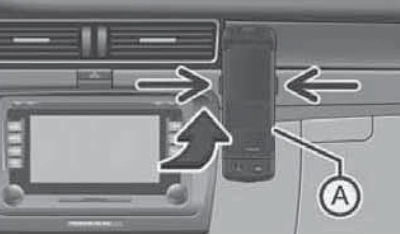
Insert the adapter (And in illustration 15.4) into the holder first all the way up in the direction of the arrow, and then lightly press the adapter down until it clicks into place. Then insert the phone into the adapter (according to the manufacturer's instructions).
15.4 Installing and removing the phone adapter
To remove the adapter from the holder, press the buttons on the sides of the holder (see illustration 15.4), remove the phone together with the adapter.
Note: Removing the phone from the adapter during a call may result in a disconnection. Removing the phone from the adapter will cause the connection to the standard antenna to be disconnected, thereby reducing the quality of reception/transmission. In addition, the phone's battery will stop charging.
Control your phone from the holder
Voice control of the phone is activated by short pressing of the "PTT" button (with a telephone handset symbol) on the adapter. On some adapters, in addition to the "PTT" button, there is also an "SOS" button. After pressing the "SOS" button, the number 112 is dialed within 2 seconds.
Controlling your phone via the instrument cluster display
The phone can be controlled via the "Phone" submenu of the main menu of the instrument cluster display (Section 13). The following describes the items in the "Phone" menu.
Note: On models with the "Amundsen+" navigation system, the "Dial", "Voicemail" and "Bluetooth "are available from the navigation system menu, but the "Settings" item is not available.
Phone book is a list of contacts copied from the memory and SIM card of a mobile phone.
Dial - enter any phone numbers. Using the knurled head setup key, select the required numbers one by one and confirm their entry by pressing the key. You can select numbers 0-9, symbols +, *, # and the functions "Delete", "Call", "Cancel".
Call lists - select the desired call list: missed, received or recent.
Voicemail - Set your voicemail number.
Bluetooth - select the following items:
- User - overview of profiles saved in memory;
- New User - Search for New Phones;
- Visibility - Enables the hands-free device to be discovered by other devices;
- Media player - select active device or connected devices, and search;
- Phone name - the ability to change the name of the handsfree device (preset - "SKODA_BT").
Settings - select the following items:
- Phone book;
- Refresh;
- Sorting (by last name or first name);
- Ringtone.
Back - return to the main menu of the phone.
Play music via Bluetooth
Universal GSM Phone Preparation II allows you to play music via Bluetooth from devices such as MP3 player, mobile phone or laptop (they must support Bluetooth A2DP profile). To be able to play music via Bluetooth, you must connect the corresponding device with hands-free via the menu "Phone>Bluetooth>Media player" (see subsection above).
Music playback from a connected device can be controlled via the hands-free device using voice control (see subsection below) or directly through a connected device.
Voice control of the phone
The time during which the hands-free device is ready to receive and execute voice commands is called "dialogue". The system responds to voice commands with an audio message and, if necessary, provides information on individual functions.
You can start/end a conversation at any time by pressing the PTT button (with a handset, except for models with the Columbus navigation system) on the telephone adapter or on the multi-function steering wheel. You can also end a conversation with the voice command "Cancel". Pressing the PTT button during a message ends the message just played. In the case of an incoming call, the conversation ends immediately and the call can be accepted by pressing the PTT button on the multi-function steering wheel or by pressing the button for accepting a call directly on the telephone.
If the system does not recognize the voice command, it displays the first part of the help, thus providing the opportunity to give a new task. After the 2nd erroneous attempt, the system displays the second part of the help. After the 3rd erroneous attempt, the response is "Cancel" and the dialogue ends.
For optimal perception of a voice command, the following conditions must be met:
- speak with normal voice volume, without accent and excessive pauses;
- avoid bad pronunciation;
- close doors, windows and overhead hatch to limit environmental exposure;
- at higher speeds, speak louder so that the command is not drowned out by noise;
- during the dialogue, limit extraneous noise in the car, such as conversations between passengers;
- do not talk when the device issues any command;
- the voice control microphone is directed towards the driver, so the device may respond less well to commands from the front passenger.
Below is a list of voice commands for controlling your phone using English as an example.
- HELP Displays all possible commands.
- CALL XYZ Call a subscriber from the phone book (see above).
- PHONE BOOK After this command you can, for example, listen to the phone book entries, edit the voice tag, delete it, etc.
- CALL REGISTER Lists of dialed numbers, missed calls, etc.
- DIAL NUMBER After this command, you can set the phone number for subsequent dialing.
- REDIAL Call the last dialed number.
- MUSIC Play music from a mobile phone or other connected device (on models with the "Amundsen+" navigation system, this function is accessed via the navigation system menu).
- FURTHER OPTIONS Select other commands for the current menu/operating mode.
- SETTINGS Bluetooth settings, dialog, etc.
- CANCEL End the dialogue.
A telephone number can be specified as a sequence of individual digits or blocks of digits (with pauses after each block). After each block of digits separated by a short interval, the system repeats all digits recognized so far. The digits allowed are 0-9, the symbols +, * and #. The system does not recognize combinations of numbers (for example, "twenty three").
Below is an example of a dialogue (command - response) when calling a subscriber from the phone book (after pressing the key "PTT"): "CALL XYZ" - "Say home, work, mobile", "WORK" (For example) -"XYZ work is dialed.", "CALL XYZ WORK" - "XYZ work is dialed."
(The original can be viewed on: SkodaBook.ru)