



Caution: The following assistance systems do not relieve the driver from the need to pay attention while driving, especially when reversing. Some thin objects located less than 30 cm away, as well as objects located above or below the detection range of the sensors, may not be detected and may damage the vehicle. Ultrasonic waves at the frequency of the sensors, heavy precipitation and/or other conditions in which the waves are distorted (for example, heavy rain), may impair the ability of the sensors to detect obstacles. In addition, objects that absorb ultrasonic waves may not always be detected due to unfavorable surface characteristics. In some cases, water on the parking assistance sensors may be mistaken for an obstacle. Uneven asphalt or cobblestone surfaces may cause false triggering of the sensors.
Parking assistance system
Depending on the equipment, a parking assistance system may be installed (back, or front and back) with acoustic or visual indication. On models with a graphical instrument cluster display, the tone of the warning sounds can be adjusted via its menu.
The rear parking assistance system uses ultrasonic sensors installed in the rear bumper (see illustration 17.1). If the front and rear parking assistance system is installed, sensors are additionally installed in the front bumper (see illustration 17.2). Each bumper can have 4 sensors: if the parking autopilot is present, two side sensors are additionally installed in the front bumper. Ultrasonic waves emitted by the sensors are reflected from obstacles. When the waves subsequently hit the sensor, the distance to the obstacle is determined. The front sensors detect an obstacle at a distance of no more than 120 cm in the forward direction, and the rear sensors detect an obstacle at a distance of no more than 160 cm in the rear direction. For normal operation of the system, keep the sensors clean. When washing, it is permissible to direct a jet of water under high pressure at the sensors from a distance of no more than 10 cm and only for a short time.
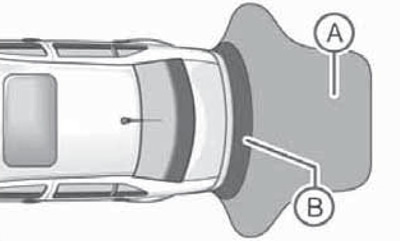
17.1 Detection areas of the rear parking assistance sensors
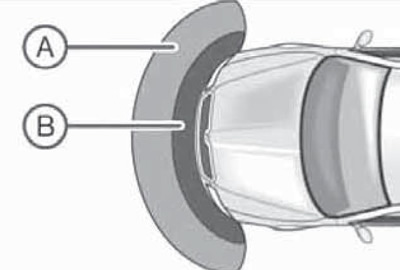
17.2 Detection areas of the parking assistance system sensors in the front bumper
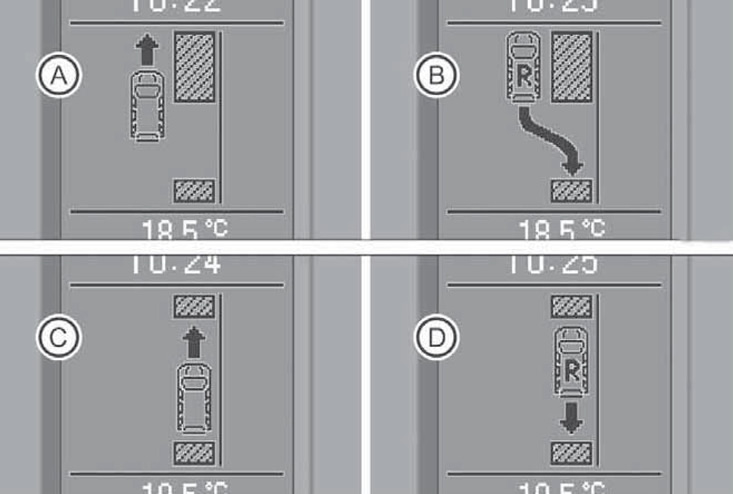
17.3 Parking Assist Indication
The parking assistance system is switched on/off automatically when the reverse gear is engaged/disengaged if the ignition is on. On models with front sensors, there is an additional button on the center console to activate the system "
 " (30 in illustration 12.1) with an on indicator. Successful system activation is accompanied by a short beep. If the signal is given within 3 seconds after the reverse gear is engaged, and there are no obstacles near the car, then the system is faulty. The system malfunction is additionally indicated by the flashing indicator in the key (if available). On models with front sensors, the system is automatically switched off when accelerating to a speed of more than 10 km/h. When connecting the trailer wiring to the standard towing hitch connector, the sensors in the rear bumper do not turn on; in some configurations, an image of the trailer appears on the audio/navigation system display.
When the parking assistance system is activated, no signals are given if the DSG mode selector lever is in the "P" position.
On models with an acoustic signal, an intermittent sound signal is emitted when an obstacle is detected. As the obstacle is approached, the duration of the pauses in this signal decreases and, when the approach is critical, a continuous signal is emitted. On models without a standard towing hitch (TSU), the critical distance is 30 cm, and on models with a standard towing hitch, this distance is increased by 5 cm.
If a standard audio/navigation unit of a certain model is available, its display can show visual indication of data coming from sensors, and the audio/navigation system can be used to set up a volume reduction when the parking assistance system is activated. The closer the car is to the obstacle, the closer the corresponding segment is to the image of the car. Displaying the penultimate segment means that the collision zone has been reached. The red segment on the color display lights up when the distance to the obstacle is critical.
Parking autopilot "Park Assist"
The parking autopilot is designed to help the driver find a suitable free parking space and enter this space. The parking space must be at least 1.4 m longer than the length of the car. The parking autopilot includes a rear and front parking assistance system (see subsection above), providing support to the driver when entering a parking space.
[Information presented on the website: SkodaBook]
In addition to the special features of using the parking assistance system, the following features should be kept in mind when using the parking assistant.
- The parking autopilot is based on parked cars and does not take into account the position of curbs and other conditions, so be careful not to damage the wheels.
- The accuracy of the parking space gap estimation may be affected by an erroneous signal from the outside air temperature (from the corresponding sensor), for example, due to the strong influence of thermal radiation from the engine.
- Parking Assist cannot provide automatic parking on a sharp turn.
- If the parking assistant starts to work worse after changing the wheels, it should be adapted to the new wheel circumference. Adaptation occurs automatically while driving.
When connecting the trailer wiring to the standard towing hitch connector, the parking autopilot does not turn on.
To prepare for parking, follow these steps.
- Make sure the ESP system is on (ESP K/L is not lit).
- Moving at a distance of 0.5-2 m along parked cars at a speed of no more than 30 km/h, press the "
 " parking autopilot (29 in illustration 12.1), - the autopilot indication will appear on the display in the instrument cluster, and the indicator in the key will light up.
 - If you press the autopilot button at a speed of between 30 and 50 km/h, the instrument cluster display will show a message about exceeding the speed limit for registering a free parking space. The autopilot indication will appear when the speed drops below 30 km/h. If the speed exceeds 50 km/h, the indication must be reactivated by pressing the autopilot button again.
- After the autopilot is turned on, the search for a free parking space is performed on both sides of the car, but by default the indication is displayed only for the right side. If you plan to park on the left side of the road, turn on the left turn signals.
- If a free parking space is found, its parameters are entered into memory and stored until another suitable gap is found or until the distance from the first place exceeds 10 m. Therefore, you can turn on the parking autopilot even after passing a free space, and the display will show information about whether this place is suitable for parking.
To park, follow these steps, which you have 3 minutes to complete.
- As soon as the parking autopilot has determined a free parking space during the above steps, the display shows the following indication: (And in illustration 17.3). After this, you should continue driving until the indicator (B) appears.
- After the indicator (B) appears, stop the vehicle for about a second and then engage reverse gear.
- As soon as the message "Automatic steering. Look around!" appears on the display, release the steering wheel - the system takes over steering control.
- Carefully monitoring the surrounding area, start moving in reverse at a speed of no more than 7 km / h. If you cannot complete parking in one go, it continues with further actions.
- If the display shows (C), engage the forward gear and, while paying close attention to your surroundings, begin moving forward at a speed of no more than 7 km/h. If parking is not completed after this, it continues with the following actions.
- If the display shows (D), engage reverse gear and, while carefully monitoring your surroundings, begin moving forward at a speed of no more than 7 km/h.
- The actions described in the last two points can be repeated several times. Complete the parking maneuver according to the information from the parking assistance system. As soon as parking is completed, a beep sounds and the display shows the message "Automatic steering completed. Take control!"
The parking autopilot is switched off if any of the following events occur:
- parking assistant button pressed;
- the speed during the search for a free space exceeded 30 km/h;
- the speed during parking exceeded 7 km/h;
- time (3 minutes) for parking has expired;
- the parking assistance system was activated;
- aSR function is disabled;
- the driver prevents the steering wheel from turning, or turns it himself;
- when reversing is required, the DSG selector lever is moved out of the "R" position.
The following describes the possible messages from the parking assistant that may be displayed on the instrument cluster display.
Park Assist finished. (Parking.autopilot completed.) - the parking process is complete, or the car was still moving at a speed of no more than 10 km/h after the ignition was turned on.
Park Assist: Speed too high! (Park, autopilot: speed too high!) - reduce speed to at least 30 km/h.
Driver steering intervention: Please take oversteering! (Driver Intervention: Take Control!) - the parking process was terminated due to driver intervention.
Park Assist finished. ASR deactivated. (Parking assistant is off. ASR is off.) - the parking process is not possible due to the ASR system being switched off.
ASR deactivated. Please take over steering! (Park.autopilot: finished. ASR is off!) - the parking process was completed due to the ASR system being switched off during parking.
Trailer: Park Assist finished. (Trailer: Park. Autopilot completed.) - parking cannot be performed because the trailer's electrical wiring is connected.
Time limit exceeded! Please take over steering! (Time limit exceeded. Take control!) - the parking process was terminated due to exceeding the time limit (180 sec).
Park Assist currently not available. (Park, autopilot is currently unavailable.) - Parking Assist cannot be activated because there is a fault in the vehicle. Fix the fault.
Park Assist ended. System currently not available. (Parking autopilot has completed its work. The system is currently unavailable.) - The parking process has been completed because there is a malfunction in the vehicle. Please fix the malfunction.
Park Assist faulty. Workshop! (Parking saw malfunction. Repair required!) - parking is impossible due to its malfunction. Fix the malfunction at the service station.
Steering interv. active. Monitor area around veh.! (Automatic steering. Look around!) - Parking Assist is active and takes over steering control. Watch your surroundings and carefully reverse.
Please take over steering! Finish parking manually! (Take control! Finish the park, manually!) - Take control. Complete parking without using the parking assistant.
Speed to high! Please take over steering! (Speed too high. Take control!) - the parking process was terminated due to speeding.
Park Assist: ASR intervention. (Parking Assistant: ASR intervention.) - intervention of the ASR system during the search for a suitable parking space.
ASR intervention! Please take over steering! (ASR Intervention: Take Control!) - the parking process was stopped due to intervention from the ASR system.
Park Assist: Stationary time not sufficient. (ASR intervention. Take control!) - the stopping time before gear shifting was shorter than 1 s.
Park Assist: Speed to low. (Park.autopilot: speed too low.) - after turning on the ignition, the vehicle speed must exceed 10 km/h at least once.