



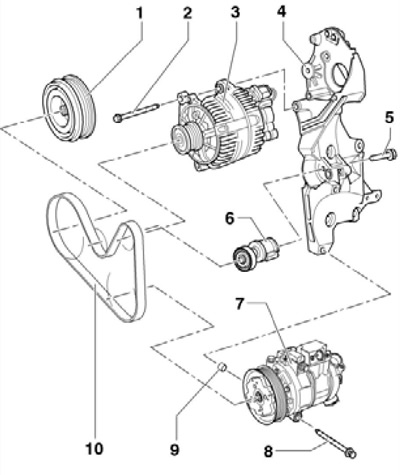
35.1 Auxiliary drive components (using the example of models with a compressor)
1 Crankshaft pulley
2 Bolt, 25 Nm
3 Generator
4 Auxiliary bracket
5 Bolt, to be replaced, 20 Nm, then tighten to an angle of 180°
6 Belt tensioner 10
7 Refrigeration compressor
8 Bolt, 45 Nm
9 Centering sleeve for compressor 7
10 Auxiliary drive belt
Accessory drive belt and its tensioner
2. Remove the sound insulation under the engine compartment and the right front wheel arch liner (see Chapter 11).
3. Turn the belt tensioner in the direction of the arrow (see accompanying illustration), to loosen the belt tension.
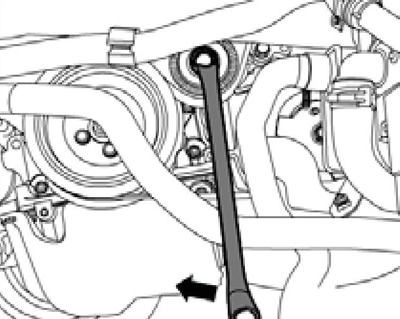
35.3 Loosening the belt tension
4. Pull the tensioner to align the holes (see accompanying illustration) and lock the tensioner by inserting pin T10060A into these holes.
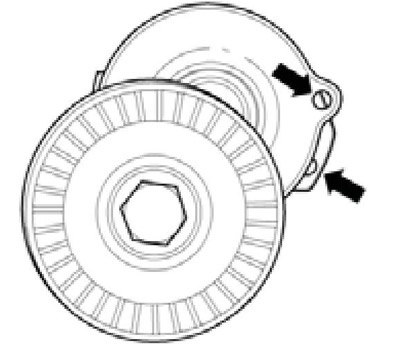
35.4 Tensioner locking
5. If the belt being removed is to be reused, mark the direction of rotation on the belt. Remove the accessory drive belt. If necessary, after removing the belt, you can remove/install the belt tensioner as described in paragraphs 6-9. To install the belt, proceed to paragraph 10.
6. Remove the right air pressure hose (see accompanying illustration) and the casing together with the radiator fans (see Chapter 3).
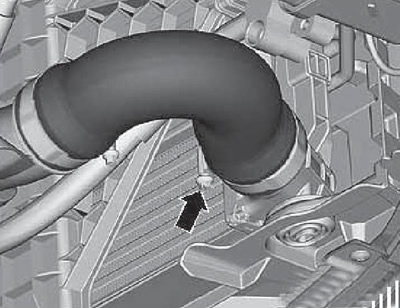
35.6 Right Air Pressure Hose
7. Remove the bolts (arrows in the accompanying illustration), release the coolant hose (3), loosen the clamp (2), disconnect the connector (1) of the boost pressure sensor "G31" from the IAT sensor "G42" and remove the right pressure air pipe.
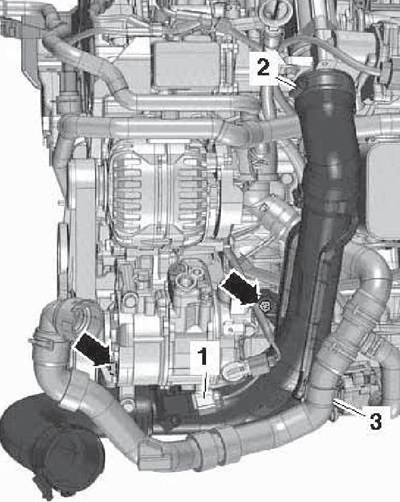
35.7 Removing the right air pressure tube
8. Unscrew the bolt (2 on the accompanying illustration) and remove the tensioner (1).
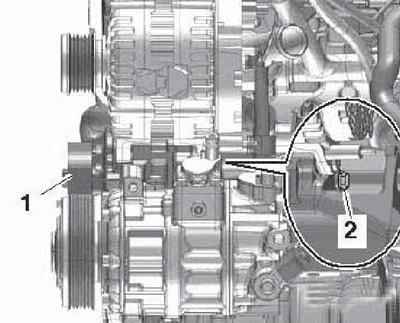
35.8 Removing the drive belt tensioner
9. Install the tensioner in the reverse order. Use a new tensioner mounting bolt.
10. Before installing the belt, make sure all accessories are securely fastened.
11. Place the alternator belt first on the crankshaft pulley, then on the compressor and alternator pulleys in accordance with the routing diagram (see illustration 35.1). If a used belt is being installed, the marks on it must face the direction of its rotation when the engine is running.
12. Turn the belt tensioner slightly in the direction of the arrow (see illustration 35.3) and remove the T10060A locking pin to tighten the belt. Make sure the belt is seated correctly on the pulleys.
Auxiliary units bracket
13. To remove the bracket, remove the auxiliary units and unscrew the bracket mounting bolts.
14. Before installing the bracket, make sure that there is enough space between it and the cylinder block in the threaded hole (6 on the accompanying illustration) there is a bushing. Use new M10 bracket mounting bolts. Bolts (1 and 2) are 52 mm long, bolts (3 and 4) are 30 mm long, and bolts (5 and 6) are 60 mm long. Tighten the bolts in sequence (1-6) first by hand, then with a force of 40 Nm, and then tighten bolts (1 and 2) to an angle of 90°, bolts (3 and 4) to an angle of 45°, and bolts (5 and 6) to an angle of 90°.
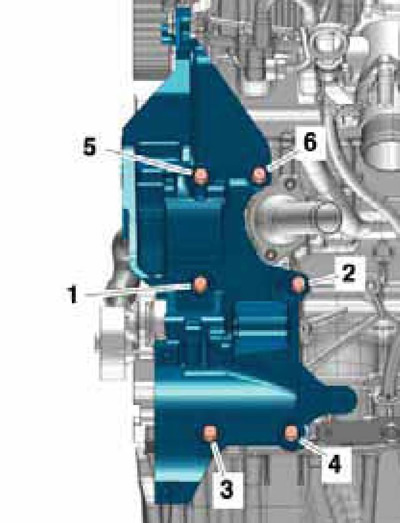
35.14 Bracket mounting bolts
Crankshaft pulley
15. Remove the accessory drive belt (see subsection above).
16. Remove the crankshaft pulley cover.
17. Loosen the pulley mounting bolts, holding it from turning with a spanner on the central bolt (see accompanying illustration). Remove the pulley.
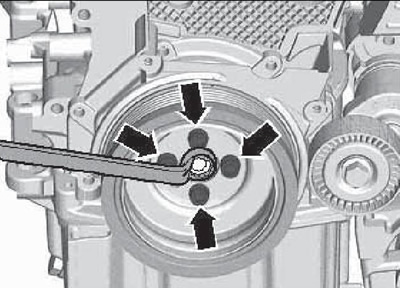
35.17 Removing the crankshaft pulley
18. Installation is carried out in the reverse order. The pulley is installed in only one position, since it has a centering hole. Use new pulley mounting bolts.