



Contents: Speedometer and tachometer ⬇ Fuel reserve indicator and fuel…⬇ Coolant and K/L temperature gauge…⬇ Instrument cluster keys ⬇ Display in the instrument cluster ⬇ Control lamps and indicators in the…⬇
The general appearance of the instrument cluster and the arrangement of the control and measuring instruments on it are shown in Figure 13.1.
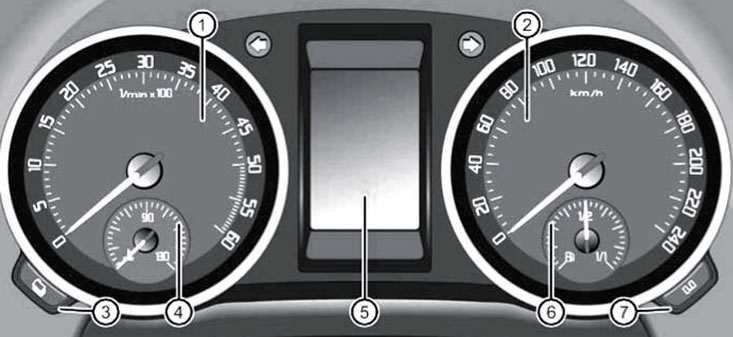
13.1. Elements of the instrument cluster 1. Speedometer; 2. Tachometer; 3. Left button "menu"; 4. Coolant temperature gauge; 5. Display; 6. Fuel gauge; 7. Right button "0.0"
Speedometer and tachometer
The speedometer shows the vehicle's speed in km/h. On models for some countries, a warning sound is emitted at speeds over 120 km/h. The tachometer shows the engine crankshaft speed in hundreds of rpm and is designed to monitor engine speed. Do not allow the tachometer needle to move into the solid red zone of the scale (shift into a higher gear or release the gas). When the tachometer needle moves into the red zone, the engine speed is limited by the engine control unit to a safe level.
Note: The size of the installed tyres affects the operation of the vehicle's speedometer, so when installing tyres of a different diameter, changes must be made to the engine management system to correct the speedometer readings and the operation of the ESP system - contact a Skoda representative.
Note: Upshifting early will save fuel and reduce engine noise. During the vehicle's running-in period, excessively high crankshaft speeds should be avoided.
Fuel reserve indicator and fuel reserve usage K/L
Fuel gauge reading error (6 in illustration 13.1) is minimal when the vehicle is in a strictly horizontal position, and increases when the vehicle is moving on winding or hilly roads. The indicator only works when the ignition is on. The triangular arrow located to the side of the fuel pump icon on the left side of the gauge indicates the side of the vehicle on which the fuel filler flap is located. When the pointer enters the red area at the beginning of the scale, it means that the reserve fuel supply is being used (approximately 10.5 l) and is accompanied by the switching on of a yellow control lamp in the form of a fuel pump under the scale. On some models, an additional sound signal is given, and the message "Fill up! Power reserve... km" is additionally displayed on the instrument cluster display. In this case, refuel at the first opportunity, since operating the car with a low fuel reserve can lead to interruptions in engine operation when driving uphill or downhill, as well as damage to the catalytic converter due to misfires. When the fuel reserve is low, the additional heater is automatically switched off. If the engine is running unstable due to low fuel supply, the power steering, as well as all driver assistance systems and vehicle dynamics control systems, may be switched off.
Coolant and K/L temperature gauge for engine cooling system
Coolant temperature gauge (4 in illustration 13.1) works only when the ignition is on.
If the arrow is in the left zone of the scale, it means that the engine is not yet warmed up; you should avoid driving at high revs, high speed and with a large load on the engine.
During normal operation of the vehicle, the pointer is in the middle of the scale. When the engine is under heavy load and, above all, when the outside air temperature is high, the needle may move to the right side of the scale. This temporary phenomenon does not indicate a malfunction until the overheating K/L lights up. At the same time, avoid running the engine at high revs and high vehicle speeds. For normal engine cooling, the radiator grille must not be obstructed by additional headlights or other equipment.
The low level/high coolant temperature indicator light under the gauge scale comes on for a few seconds when the ignition is turned on to check the serviceability, and then should go out. On models with a multifunction display, the K/L in the instrument cluster lights up only if there is a malfunction or if the coolant level is low. If this K/L does not go out or flashes, there is a malfunction in the cooling system. On models with a multi-function instrument cluster display, when this K/L is switched on, the display shows the message "Coolant check! Operating instructions!".
If this happens at high coolant temperatures, the engine is overheated. In this case, you should reduce the load on the engine, if possible, turn on the air conditioning system to maximum heating and open the windows. If this does not help, stop the car and let the engine idle until the coolant temperature returns to normal. If necessary, turn off the engine and let it cool. Overheating may occur due to a faulty fan - check its fuse (see Chapter 12).
If the K/L light comes on when the coolant temperature is normal, the coolant level is too low. Stop the car, turn off the engine, wait for it to cool down and adjust the coolant level (see Chapter 1). If the coolant level is normal, the activation of the K/L indicates a malfunction in the engine cooling system. In this case, do not continue driving with the engine running, call for technical assistance.
Instrument cluster keys
Note: In some trim levels, the clock time can only be set via the "Settings→Time" menu on the instrument cluster display (see subsection below).
The left and right keys of the instrument cluster are used to reset the maintenance indicator (see subsection below) and setting the time on the clock.
To set the time when the display shows the hours, use the left key to select the hours or minutes digit, and then use the right key to change the value of the selected digit. To complete the time setting, press the left button again.
The left key is additionally used to display information about the interval until the next maintenance (see subsection below) and activation/deactivation of additional speed display.
The right key is additionally used to reset the resettable odometer (press the button while this meter is displaying its readings and hold it for about one second) and activation/deactivation of the selected mode.
Display in the instrument cluster
Caution: Do not be distracted by the display if the traffic situation does not allow it.
The instrument cluster can be equipped with a standard or multifunctional display. Depending on the vehicle configuration, the display is designed to show the following information:
- odometer;
- resettable odometer;
- time;
- outside air temperature;
- selector lever position for DSG models;
- recommendation for choosing a gear;
- current speed of the car;
- information messages;
- audio/navigation system and phone data;
- warnings of dangerous situations;
- warnings about malfunctions in the operation of vehicle components and systems;
- settings menu (see subsection below);
- maintenance information;
- system information "Stall-Slop" (see Section 18);
- trip computer data (see subsection below).
If a malfunction of the instrument cluster is detected, the message "Error" appears on the display.
The odometer shows the total mileage of the vehicle. Resetting this counter is not allowed. If the second speed display is activated, it replaces the odometer reading.
A resettable trip counter (trip) counts the mileage to within 100 m from the last time it was reset. To reset this counter, use the right button on the instrument panel (see above).
Setting the time on the clock is done using the keys on the instrument cluster (see subsection above).
The outside air temperature is displayed only when the ignition is on. When the vehicle is stationary or moving at very low speeds, the reading may be slightly higher than the true value due to the influence of thermal radiation from the engine. At temperatures below +4°C, a snowflake symbol appears next to the temperature display, warning of the possibility of ice forming on the road.
Note: Ice formation, especially on bridges, is possible even at low positive temperatures, at which the ice warning does not work. Therefore, you should not rely entirely on ice warnings.
The position of the selector lever on models with DSG is indicated as on the side of the lever (see Section 23). and in the upper right corner of the instrument cluster display. In the D and S modes, as well as in the manual "Tiptronic" mode, the display additionally shows the engaged gear (e.g. "D4").
On some models with manual transmission, a recommendation to change gear in order to save fuel is displayed in the upper right corner: up/down arrow - recommendation to shift to higher/lower gear (the recommended gear is displayed next to the arrow), and the point is - there are no recommendations. When the clutch pedal is depressed, the gear shift recommendation goes out. On diesel models with a DPF, when the ECU detects that the DPF is clogged, a gear shift recommendation may be issued to maintain conditions necessary to clean the filter (it may be necessary to drive at higher engine speeds).
Note: Regardless of the gear shift recommendation, the driver always remains responsible for controlling the vehicle.
The current speed indication can be displayed on the screen in addition to the speedometer readings in the same or other units of measurement (mph or km/h). Indication of the current speed is included in the set of functions of the trip computer. On models with a multi-function display, the speed indication is enabled via the "Settings→Second speed indication" menu of the display.
Warnings about malfunctions in some vehicle components and systems are given in the form of flashing or continuously illuminated red or yellow pictograms with explanatory messages, which in some cases are accompanied by an audible signal. Highest priority warnings have red icons; if such a warning is present, you should stop the vehicle at the first opportunity, check the operation of the specified system and eliminate the malfunction, or call for technical assistance. High priority warnings are accompanied by three audible signals. Warnings with lower priority have yellow icons and if such a warning is present, the operation of the relevant system should be checked as soon as possible or the relevant fluid should be added. Lower priority warnings are accompanied by a single beep. Depending on the instrument cluster design, the warning indication may vary. If warning and information messages are not provided for on the display, then only control lamps will indicate malfunctions. If there are several warnings, the corresponding icons appear one after another at intervals of several seconds. These icons will be displayed until the reasons for their appearance are eliminated.
Maintenance indicator
The service indicator only informs you when the service is due and when the engine oil should be changed. Information on the timing of other types of maintenance (for example, replacing brake fluid) indicated on the sticker on the left end of the instrument panel or in the service book.
[Material is available on the website SkodaBook]
When the due date for maintenance approaches, a reminder of the upcoming service appears when the ignition is switched on: the instrument cluster display shows a wrench icon and the mileage until the upcoming maintenance rounded up to 100 km. After a few seconds, a clock icon appears and the number of days until the upcoming maintenance. On models with the ability to display text messages on the instrument cluster display, a reminder of the upcoming maintenance is given as the message "Maintenance in --- km or --- days." The maintenance message disappears after a few seconds.
After the maintenance deadline, when you turn on the ignition, a wrench icon will flash on the display for 20 seconds, or the message "Maintenance now!" will appear.
A request for an upcoming maintenance can be made with the engine turned off and the ignition on, but not earlier than 500 km after the maintenance (before that, dashes will be displayed). To do this, press the left button of the instrument cluster until a wrench icon appears on the display. You can also select the menu item "Settings→Service info→Information". If the maintenance is overdue, the mileage and the time left until the maintenance are displayed with a minus sign, or the message "Maintenance overdue --- km, or --- days" is displayed.
If the maintenance was not carried out at a Skoda service station, the service indicator should be reset as follows. On models with a display without text messages, while the maintenance deadline is being displayed, press and hold the right "0.0" button on the instrument cluster. On models with the ability to display text messages on the display, select the menu item "Settings→Service info→Restart" and confirm the request by pressing the "OK" button.
Note: Do not reset the maintenance indicator between engine oil changes, as this will cause incorrect information about the next maintenance to be displayed.
After disconnecting the vehicle battery, the maintenance indicator readings remain.
If the car is serviced under the program "Long Life service" (see Section 3 Chapter 1), then after resetting the maintenance indicator in the manner described above, a transition to maintenance according to a program with fixed time or mileage intervals occurs, i.e. individual operating conditions of the vehicle will not be taken into account when calculating the maintenance time.
Trip computer
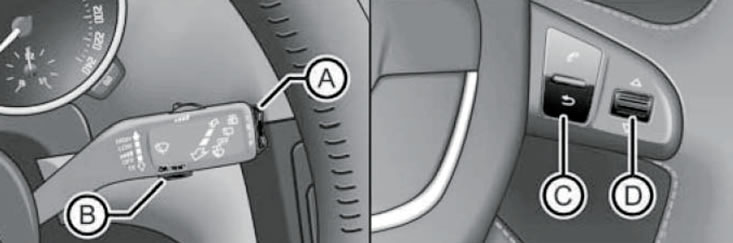
13.2. The "OK/RESET" (B) and "TRIP" (A) buttons on the right steering column switch, as well as the buttons on the right spoke of the steering wheel
The trip computer is controlled by the keys on the right steering column switch and, if available, on the right spoke of the steering wheel (see illustration 13.2):
- "TRIP" (A) - to switch between menu items/trip computer readings, change the value of the selected parameter, and also to enter the main menu (when holding);
- "OK/RESET" (B) - to confirm viewing of a message, confirming the selection of a menu item, selecting a trip computer memory cell (multiple press) and its purification (long press);
- "
 " (C) - button to return to the previous menu (with a short press) or to the main menu (when holding), and also call the trip computer menu;
 - buttons with triangular up/down arrows (D) - to switch between menu items, change the value of the selected parameter, and also to select a memory cell of the trip computer (move up/down), confirm selection (multiple press) and reset readings (long press) trip computer.
The trip computer has two automatic storage devices.
N°1 - memory for a single trip. This memory records driving characteristics and fuel consumption data from the moment the ignition is turned on until the moment it is turned off. If the movement is stopped for more than two hours, the memory contents are automatically deleted. If the trip is resumed within two hours after the ignition is turned off, the new data is added to the previous data.
no. 2 - memory for all trips. It records the characteristics of any number of individual trips. Depending on the instrument cluster version, data is stored for a total driving time of up to 19 h 59 min or up to 99 h 59 min, as well as for a total mileage of up to 1999 km (miles) or up to 9999 km (miles). If one of these limits is exceeded, the memory contents are automatically deleted and the recording starts from zero.
The number of the displayed memory device is indicated in the upper right corner of the central display field. To switch from the currently displayed memory device to another, with the ignition on, briefly press the key (In illustration 13.2) or tilt the switch (D) up/down. To clear the selected memory, with the ignition on, press the button (B) or switch (D) for more than a second. All data in both storage devices is erased after the battery is disconnected. To display the desired trip computer reading, turn on the ignition, select the desired memory and press the upper or lower side of the "TRIP" button on the right steering column switch. If the steering wheel buttons are used, first press button (C) to call up the trip computer menu, then move switch (D) up or down to highlight the desired item and confirm by pressing switch (D). After switching on the ignition, the trip computer reading that was displayed before switching off the ignition is displayed.
The trip computer allows you to view the following information on the instrument cluster display.
Outside air temperature (see subsection above).
Trip Time - Trip time in hours and minutes since reset.
Current (instantaneous) fuel consumption is displayed in l/100 km or miles/gallon while driving, and in l/hour or gallons/hour while stationary with the engine running. The readings are updated every 0.5 seconds.
Average fuel consumption (l/100 km or miles/gallon). Only displayed after approximately 300 m of travel since the last reset. Until this point, dashes are shown instead of the value. Readings are updated every 5 seconds.
Power reserve - approximate distance (km or miles), the distance a vehicle can travel with the fuel in its tank while driving in its current mode; for the calculation, in addition to other parameters, the average fuel consumption over the last 50 km is used. After resetting the average fuel consumption, the initial power reserve is calculated based on an average consumption of 10 liters per 100 km. With a normal fuel supply, the reading is rounded up to 10 km, and with a reserve fuel supply - up to 5 km.
Mileage - length of the path (km or miles), traveled by the car after the reset.
Average speed (km/h) is only displayed after approximately 300 m of travel since the last reset. Until this point, dashes are shown instead of the value. Readings are updated every 5 seconds.
Digital speed display - digital display of current speed (km/h or mph).
Digital oil temperature display - digital display of the current engine oil temperature. When the oil temperature is less than 50°C or there is a problem with the oil temperature monitoring system, dashes are displayed instead of the digital value.
Warning at --- km/h - provides an audible signal and, in some cases, a visual warning when the set speed is exceeded. To activate the warning, select this item and press the key (In illustration 13.2) or on the switch (D), the current speed will be accepted as the set maximum. If necessary, the set value can be adjusted for a certain period of time using switch (A) or (D), after which button (B) or switch (D) must be pressed again. The set speed limit is retained even after the ignition is switched off. To deactivate the warning, press the key (B) or the switch (D) - the saved set value is deleted.
On models with a display that can display text messages, you can select the data that will be displayed by the trip computer via the "Settings→Display data" menu.
Display menu
The trip computer is controlled by the keys on the right steering column switch and, if available, on the right spoke of the steering wheel (see illustration 13.2).
To open the main menu, turn on the ignition. If any message or icon appears, hold down the button (A or C in Illustration 13.2). By pressing the upper or lower side of the switch (A or D) repeatedly, you can highlight the desired menu item and then select it by pressing the key (B) or the switch (D).
The menu content depends on the vehicle configuration. At the Skoda service station, new menu functions can be programmed for some models or existing functions can be changed.
Some menu items can only be called up when the vehicle is stationary. In addition, if there is a high severity warning message (see above), it is not possible to display any menu items.
The display menu in the maximum configuration contains the following items.
- Multifunctional display - trip computer (see subsection above).
- Audio (Sound) - indication of the data of the received radio station or the CD/other media being played (see Section 15).
- Navigation system - information about the switched on navigation system (see Section 15).
- Phone - information and setup of the mobile phone connection kit (see Section 15).
- Additional, heater - on/off, setting the switch-on time and setting the operating mode (see Section 14).
The following submenus are available.
- Activation.
- Program on/off - heater on/off indicator.
- Switch-on time 1/2/3 - selection of automatic switch-on time.
- Deactivate - prohibit automatic activation.
- Switch-on time 1/2/3 - setting the switch-on time options for subsequent selection in the "Activation" submenu.
- Day of the week - specifying the days of the week for the selected switching time (if an empty line between Sunday and Monday is selected, the activation occurs every day).
- Hours/minutes - indicates the time of switching on.
- Activation - activation of the autonomous heater with the entered switching time without going to the "Activation" submenu.
- Operating time - duration of heater operation, from 10 to 60 minutes, in 5-minute increments.
- Working hours (heating or ventilation).
- Day of week - sets the current day of the week.
- Factory setting - setting the factory settings for the "Additional, heater" menu.
- Back - return to the main menu.
Assistants - switching on/off auxiliary systems for the driver. Active only when the standard navigation system is turned on.
Vehicle status - existing warnings about malfunctions in some vehicle units and systems (see above). The number of the viewed warning/total number of warnings is also displayed. If there are no warnings, this item is missing.
- Settings - settings for various functions. The following submenus are available.
- Language - select the language for text messages on the display and navigation system.
- Display Data - Selects the data displayed by the trip computer (see subsection above).
- Comfort - switching on/off and setting up comfort systems and functions.
- Rain detection - turns on/off the automatic closing function of the sunroof windows when rain is detected while the car is locked (only on models with rain sensor). If this function is enabled, the windows and sunroof will also close 12 hours after the car is locked, if it has not rained during this time.
- Unlocking doors (see Section 1). Manually - the algorithm of operation of a single lock when unlocking with a key fob (all doors, one door, one side of the car, individually). Automatic - settings for automatic unlocking and locking of a single lock (automatic locking, automatic unlocking).
- Confirmation of the score. (see Section 6) - turn on/off the sound signal to confirm the activation of the anti-theft alarm.
- Glass control. (Off/Select All/Driver) - setting up the algorithm for the electric window lifter when unlocking and locking the car (see Section 5).
- Mirror tilt. - switching on/off the movement of the right rear-view mirror to a preset position when reversing (only on models with electric adjustment of the driver's seat, see Section 9).
- Tune in, mirror. (Separately/Synchronization) - selection of the operating algorithm of the electric drive for adjusting the outside mirrors (see Section 9).
- Factory settings - sets the factory parameters for some items of the "Comfort" submenu. The display shows "Factory, comfort settings returned".
- Headlights and visibility - turn on/off and adjust the functions of the lighting devices.
- Coming Home - enable/disable the function "Coming Home" (see Section 12) and setting the time of lighting operation after locking the car.
- Leaving Home - enable/disable the function "Leaving Home" (see Section 12) and setting the time of lighting operation after locking the car.
- Daytime lighting mode - turn on/off the DRL function (see Section 12).
- Comfort function for direction indicators - switching on/off 3-times flashing of direction indicators when pulling the left steering column stalk up or down to the locking point (see Section 12).
- Driving mode - turning on/off the headlight settings for using the car in a country with traffic on the other side of the road.
- Factory settings - sets the factory parameters of the "Lighting and view" submenu items.
- Current time - sets the time on the clock in the instrument cluster and in the navigation system. Time can be displayed in 12-hour or 24-hour format. The S symbol at the top of the display indicates that daylight saving time has been set.
- Winter tires - setting up an audible signal and text message to warn you when you exceed the speed limit. Use this feature only if winter tires that are not rated for the vehicle's maximum speed are installed.
- Units of measurement - select units of measurement for temperature, fuel consumption and distance.
- Assistant - setting the tone of the sound signal for parking assistance systems.
- Second Speed (On/Off) - turns on/off the second indication of the vehicle speed in other units of measurement, only for models for countries with the imperial system of units.
- Service info. - request information about the timing of maintenance or resetting the maintenance indicator (Information, Reset).
- Factory Default - sets the factory settings for the Setup menu items.
- Back - go to the main menu.
The menu items "Audio", "Navigation", "Additional heater" and "Assistants" are only displayed if the corresponding system is installed at the factory and switched on (except for the "Additional heater" menu).
Control lamps and indicators in the instrument cluster
Note: Depending on the vehicle equipment, some indicator lamps may not be available in the same type of instrument cluster.
Control lamps (C/L) and indicators, except for the direction indicator indicators, are located in the speedometer and tachometer areas (see illustration 13.1). In some trim levels, some K/L and indicators are displayed only on the instrument cluster display.
Some K/L are briefly switched on when the ignition is turned on in order to check the proper functioning of the corresponding systems and the lamps themselves, and after the check is completed they should go out. If any of these K/L does not light up when the ignition is turned on or does not go out after a few seconds or after the engine is started, this may indicate either a malfunction of the lamp itself or a malfunction of the system it controls.
The activation of some K/L is accompanied by the display of an explanatory message on the instrument cluster display (if the display allows the display of text messages) and giving a sound signal.
Below is a table describing the reasons why the K/L and indicators are turned on, as well as the actions that should be taken when this happens.
 | K/L brake system, red. When turned on, this indicates a malfunction in the brake system, the parking brake is engaged, or the brake fluid level is low. Continuous illumination may be accompanied by the message "Brake fluid: Operating instructions!" on the instrument cluster display. Check and, if necessary, adjust the brake fluid level (see Section 1). Make sure the brake system is in good working order and call for technical assistance if necessary. When switched on together with the ABS K/L, this indicates a simultaneous failure of the ABS system and another part of the braking system, but you can continue driving carefully, remembering the possibility of skidding. When driving at a speed of more than 5 km/h for more than 3 seconds, the brake system K/L starts to flash. At the same time, the message "Release the handbrake!" may appear on the instrument cluster display. |
 | K/L cooling system, red (see description at the beginning of Section 13). |
 | K/L low pressure or low engine oil level (red or yellow). The red K/L lights up for a few seconds when the ignition is turned on. On models with the ability to display text messages on the instrument cluster display, the yellow K/L lights up only if there is a malfunction or the engine oil level is too low. If the red K/L light comes on while the engine is running, turn off the engine and adjust the oil level (see Chapter 1). If it is not possible to add oil, do not start the engine and call for technical assistance. If the red K/L does not go out at a normal level, you should also not start the engine without repairs. The red K/L lights up with the message "Oil pressure: turn off the engine! Operating instructions!" The constant glow of the yellow K/L indicates a low oil level, and may be accompanied by the message "Check the oil level!" If the hood is open for more than 30 seconds, the yellow K/L goes out, but if the oil level remains low, it turns on again after 100 km of travel. Flashing yellow K/L indicates a malfunction of the engine oil level sensor and may be duplicated by the message "Oil sensor. Maintenance!". |
 | Open door indicator, red. The indicator remains on until all side doors are closed, but not more than five minutes. On models with the ability to display text messages on the instrument cluster display, a schematic image of the car is displayed on the display instead of this indicator. |
 | Red tailgate open indicator. The indicator remains on until the tailgate is closed, but not more than five minutes. On models with the ability to display text messages on the instrument cluster display, a schematic image of the car is displayed on the display instead of this indicator. |
 | Steering malfunction indicator light, red or yellow. Indicates a partial failure of the power steering gear. If after restarting and a short run the yellow K/L goes out, you do not need to contact a service station. The yellow K/L can also light up if the battery was disconnected and reconnected, but after a short run the K/L should go out. |
 | K/L of unfastened seat belts for the driver and front passenger, red (see Section 7). |
 | K/L of the charging system, red. Turns on when the battery is not charging - turn off unused voltage consumers. If this K/L lights up when the engine is running, this indicates a malfunction of the generator/its drive or looseness of the wiring of the starting and charging systems. If the engine cooling system overheating light comes on along with the charging system light, stop the vehicle and turn off the engine as soon as possible to prevent engine damage. |
 | DSG overheating sensor, red. Move the selector lever to the "P" position and allow the transmission to cool. Continuing to drive with the K/L engaged may cause serious damage to the DSG. After disengaging the K/L, you can continue driving. The activation of this K/L may be accompanied by the message "Gearbox overheating. Stop. Operating instructions!" on the display in the instrument cluster. |
 | Brake pad wear indicator, yellow. The brake pads should be replaced as soon as possible. On models with the ability to display text messages on the instrument cluster display, it lights up only when wear on the brake pads is detected (duplicated by the message "Check the brake pads!", and on other models - also every time the ignition is turned on. |
 | K/L ASR/ESP, yellow. Continuously illuminates if the ASR/ESP is faulty or disabled due to system conditions. Try switching the ignition off and on and making a short trip, during which the K/L should go out with a working ASR/ESP. It may also turn on for a while after connecting the battery - in this case it should go out after covering a short distance at a speed of 15-20 km/h. Flashing indicates that the ASR/ESP is activated - release the gas pedal and take into account the road conditions when choosing a driving style. Signalling of a malfunction of the EDS function, which is part of the ESP, is also implemented by means of this K/L. |
" OFF" OFF" | ASR manual shutdown indicator, yellow. |
 | K/L ABS, yellow color. When this K/L is turned on while driving, it indicates a failure or malfunction of the ABS. The braking system continues to operate normally, but the braking distance will be longer than with the ABS system operating. Driving can be continued, but the specified systems should be checked as soon as possible. If the ABS light comes on together with the brake system light (with the parking brake released), this means that not only the ABS is faulty, but also another part of the braking system. In this case, you should stop the car and check/adjust the brake fluid level (see Chapter 1). If the brake fluid level is below the "MIN" mark, you must not continue driving. If the brake fluid level is normal, the ABS control function may have failed. As a result, the rear wheels may lock very quickly when braking. Under certain circumstances, this may cause the rear of the car to go out of its track (danger of skidding)! |
 | Rear fog light indicator, yellow. |
 | Indicator of malfunction of lamps of external lighting devices, yellow. Lights up for 2 seconds after the ignition is turned on, and also when a faulty lamp is turned on. Duplicated by a message indicating a specific lamp. The rear parking lights and number plate lights contain multiple bulbs and this indicator will only illuminate if all bulbs supplying the number plate lights and the parking lights, respectively, are faulty (in one rear combination light). |
 | The Malfunction Engine Light (MIL), yellow in color, should go out after the engine is started. If this K/L is turned on while the engine is running, it indicates a malfunction of the engine management system or the exhaust gas toxicity reduction system. You should go to the nearest service station without pressing hard on the gas pedal. Increased fuel consumption and reduced engine power are possible. |
 | Diesel engine preheating indicator, yellow. Continuous glow before starting the engine indicates that the glow plugs are working. Wait until the indicator turns off before starting the engine. If the indicator does not light for a short time after turning on the ignition or does not go out, then the preheating system is faulty. Flashing of this indicator indicates a malfunction (enabling emergency mode) in the diesel engine control system, and the engine should be checked immediately at a service station. The indicator flashing may be accompanied by the message "Engine faulty. Maintenance!". |
 | Engine management system malfunction indicator, yellow. When switched on while driving, it indicates that the engine is operating in emergency mode. The engine should be checked urgently at a service station. Increased fuel consumption and reduced engine power are possible. May be duplicated by the message "Engine fault. Tech., service!" on the display. |
 | Diesel particulate filter overfill indicator, yellow. When this indicator turns on, you should drive in 4th or 5th gear for about 15 minutes until the indicator turns off (on models with manual transmission) or in "S" mode (on models with DSG) at a speed of at least 60 km/h (at 1800-2500 rpm), so that the soot in the filter burns off. If the filter is not cleared, the pre-alarm indicator additionally flashes and the message "Diesel particulate filter. Operation manual". Subsequently, the emergency engine control mode is activated, in which the engine power is reduced, and after turning the ignition off and on, the K/L MIL lights up (see above) - contact a service station to clean the particulate filter. If these indicators are ignored, the vehicle may be damaged. |
 | Tire inflation pressure low/tire inflation pressure monitoring system malfunction indicator, yellow (see section 19). A constant glow indicates that the inflation pressure of at least one wheel has significantly decreased compared to the values set by the driver. Explanatory messages may appear on the instrument cluster display. Reduce speed and stop the car as soon as possible and check the wheels. Flashing indicates a system malfunction. If, with normal inflation pressure of all tires, after turning the ignition off and on, this K/L continues to flash or light, then the tire monitoring system needs to be repaired. Under certain circumstances (sporty driving style, driving on bad roads) the indicator may light up with a delay or not light up at all. After connecting the battery, the indicator may turn on, but after covering a short distance it should go out. |
 | Low washer fluid indicator, yellow. May be accompanied by the message "Add washer fluid!" on the instrument cluster display. |
 | Reserve fuel use indicator, yellow, see subsection at the beginning of Section 13. |
 | SRS system K/L, yellow (see Section 10). |
 | Left/right turn signal and hazard warning lights, green; rapid flashing indicates a malfunction of the turn signal lamps on the car (but not on a trailer). |
 | Indicator of the need to press the brake pedal, green. Constant illumination indicates the need to depress the brake pedal (to move the DSG selector lever out of the "P" or "N" position). |
 | Tempstat on indicator, green (see Section 16). |
 | Hill Descent Control function indicator, green. A constant glow indicates that the function is enabled (at a speed of less than 20 km/h). Flashing of the indicator indicates that the function is activated. When the speed exceeds 30 km/h, the indicator goes out (the system is shutting down), and when the speed subsequently decreases to less than 30 km/h, the indicator lights up again (the system is turning on). After turning off the engine and restarting it within 30 seconds, the function is reactivated. If the function is faulty, the indicator will not light when you try to turn it on. |
 | Fog light indicator, green. |
 | High beam indicator, blue. |
 | Low beam headlight indicator, green. |
 | Service indicator, only on instrument cluster display (see above). |